
My Tilda site is the third site I have tried installing chat tools on. SmartWidget was the first one that installed without breaking the page animations or the typography. Five minutes start to finish.
First clean install
Also searched as a Format chat widget, chat app, live chat plugin or AI chatbot — same tool, one five-minute install.
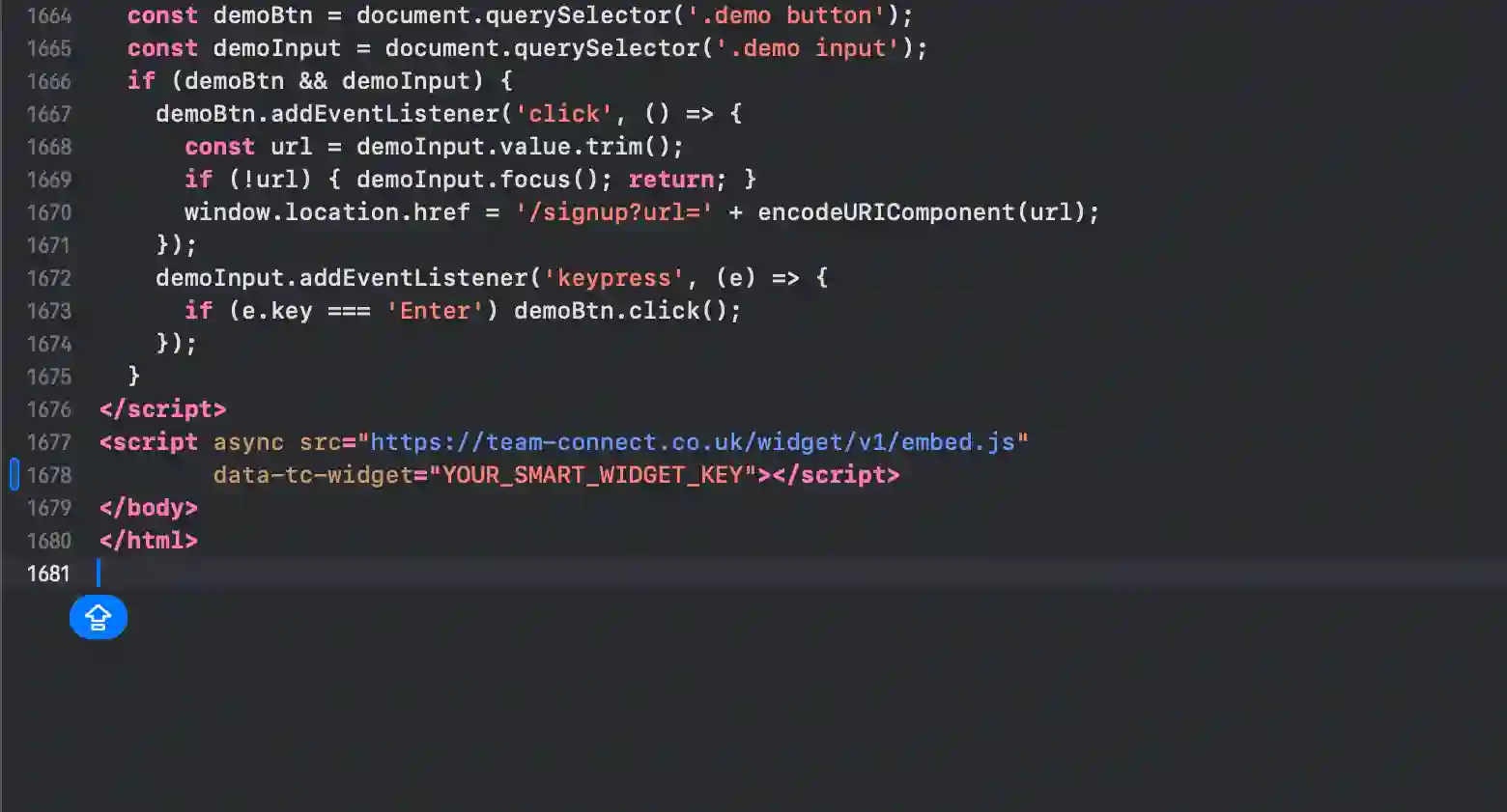
SmartWidget on Format takes about five minutes end-to-end. Sign up at smartwidget.co.uk, paste your Format site URL so the AI can read it, review the auto-generated answers, and paste a single script tag into Settings > Code Injection > Footer. £19 a month, no contract.
Format does not ship with a built-in AI chat widget — most platforms in 2026 still don't. SmartWidget adds one cleanly with a single line of JavaScript pasted into Settings > Code Injection > Footer. The AI reads your existing Format site to learn your services and tone, builds the knowledge base automatically, and goes live the moment the snippet saves. Five minutes end-to-end. £19 a month, no contract, no engineer required.
The full install end-to-end. Five steps, about five minutes from signup to the first answered visitor.
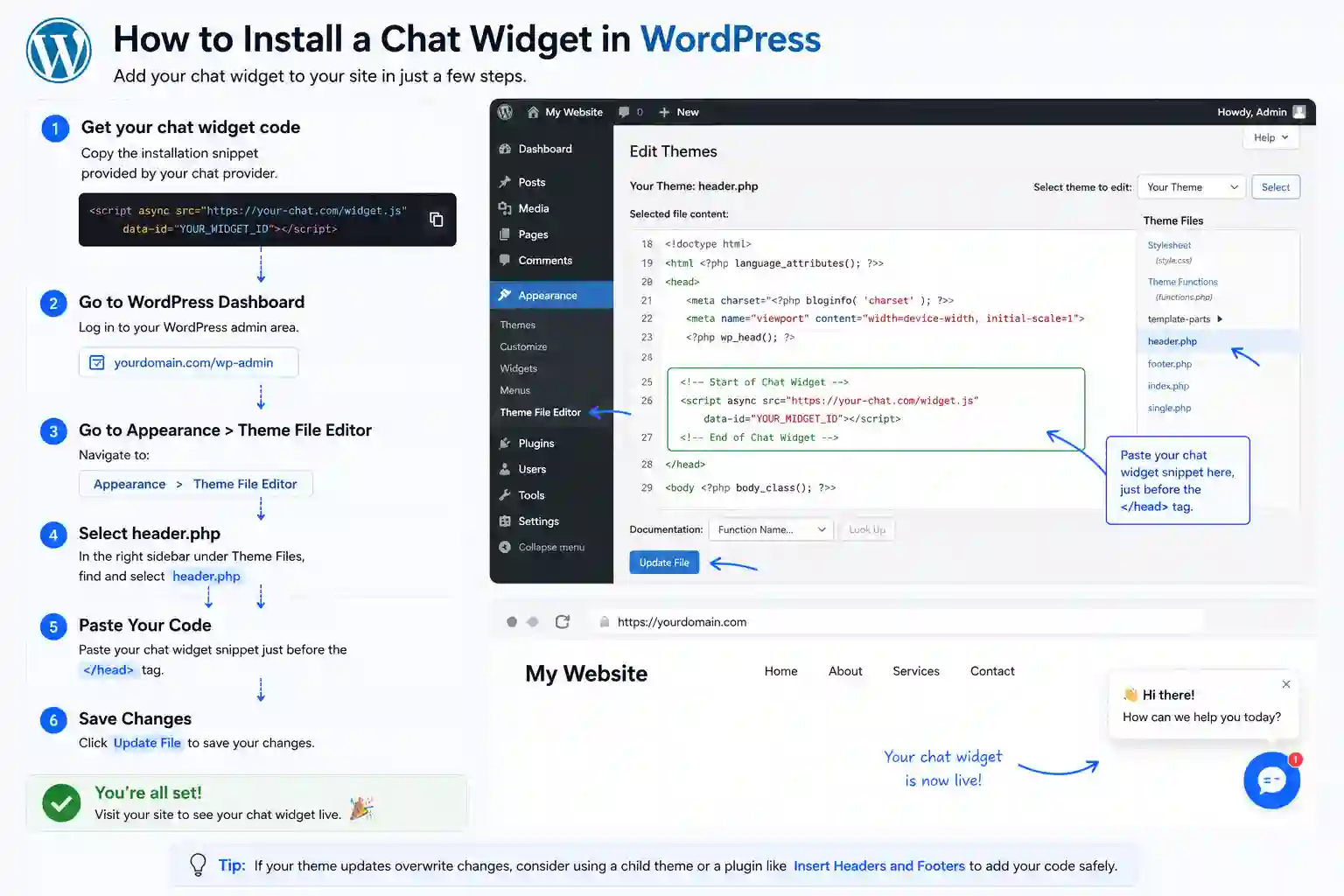
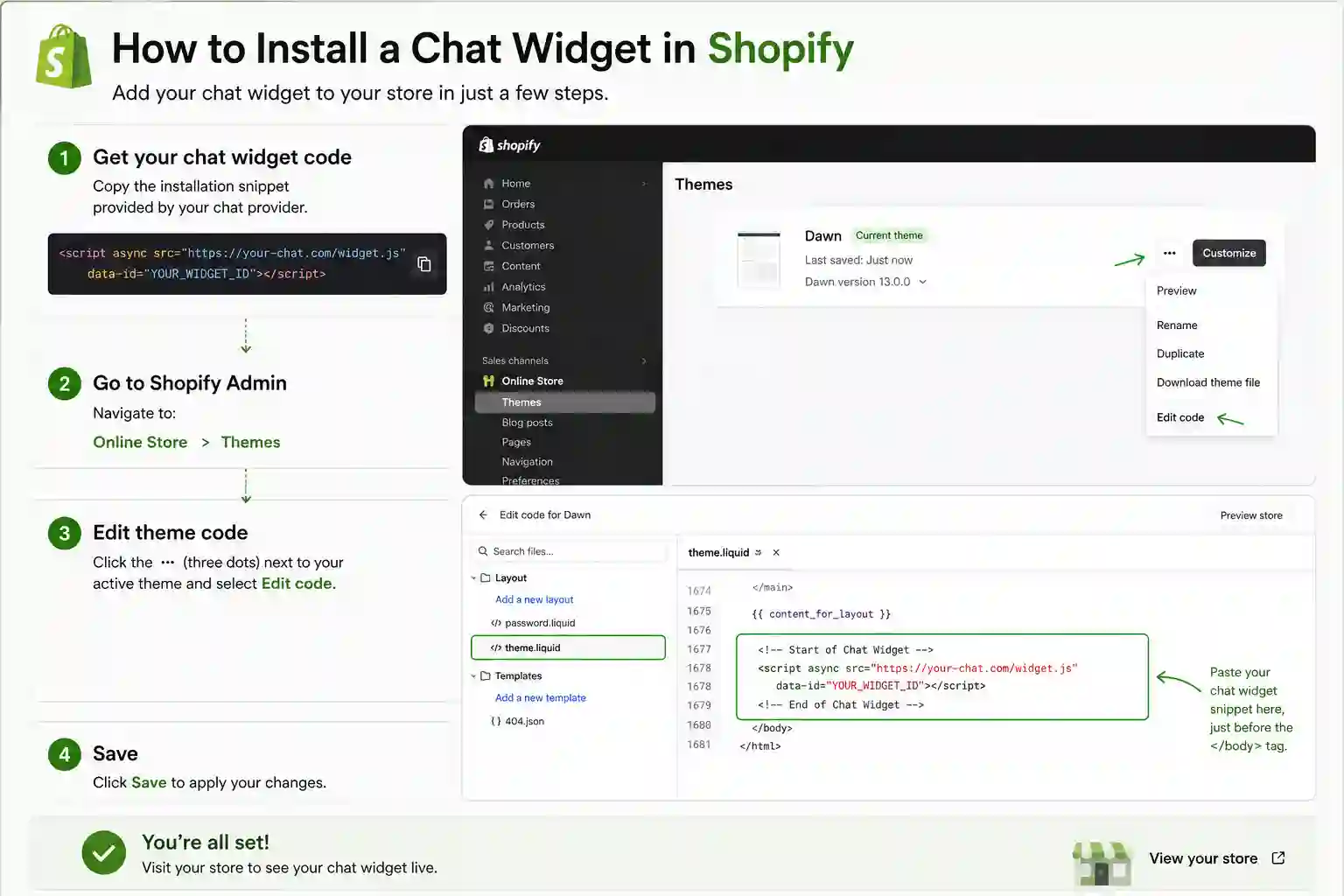
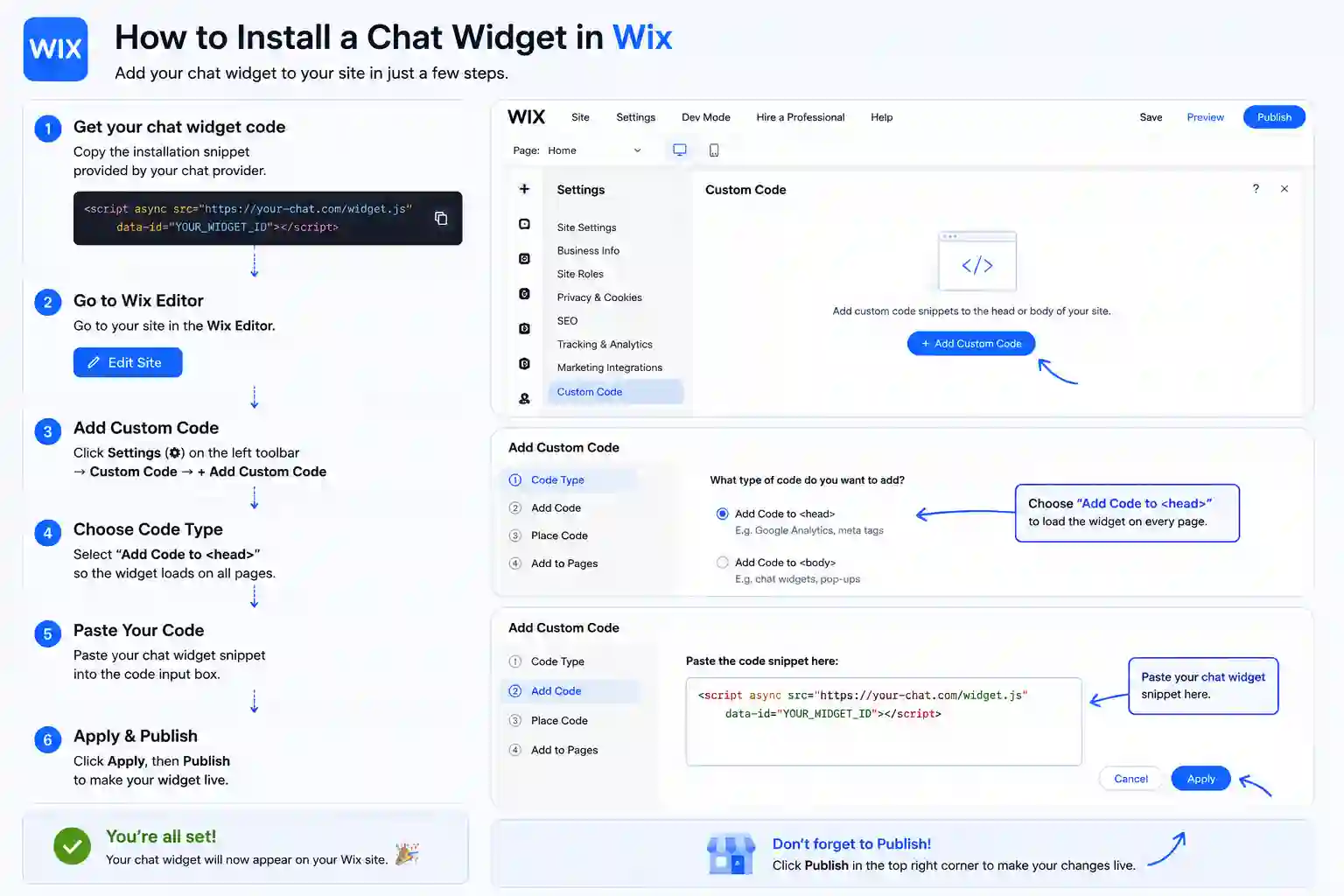
The exact panel and field to paste the snippet on every supported platform. Format is highlighted first.
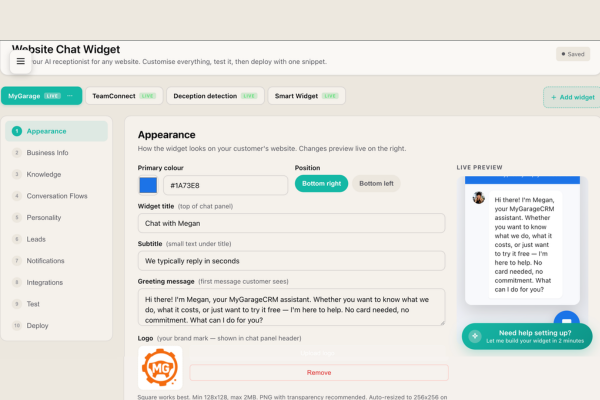
The setup dashboard is the heart of how SmartWidget configures itself for your Format business. After the AI reads your Format site, it presents what it has learned — draft Q&A pairs, services list, opening hours, pricing rules — in a clean editable interface. You review each section, edit anything that needs refining, override anything the AI got wrong, and save. The dashboard is also where you set the tone of voice and the rules for when the AI should escalate to a human.
Format sites converted around 1 to 2 percent of visitors in the contact-form era. The benchmark in the AI chat widget era is closer to 3 to 5 percent. The difference is captured by the widget — visitors arriving at 9pm, on a phone, with a specific question, who would have left without engaging. SmartWidget reads your Format site and goes live in five minutes from Settings > Code Injection > Footer.
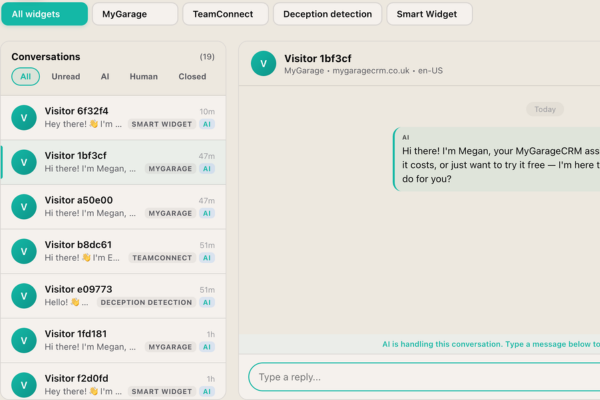
From this dashboard you can supervise every AI conversation on your Format site, jump into any one with a single click, and intervene before the AI says something you would not. The Live tab shows in-flight conversations. The Awaiting Human tab shows escalations. The Completed tab shows the archive. The Pinned tab shows the conversations you have flagged for follow-up. The visitor sees one continuous chat thread regardless of whether AI or human is replying.
A live chat app on Format needs a human at the other end. A chatbot answers on its own. SmartWidget is a chatbot in the sense that matters — it reads your Format site during signup and answers questions about your services, pricing and availability with nobody watching the inbox — but it is not a decision-tree bot with fixed buttons. It reads the question and answers it.
Most Format owners switch because live chat software costs more per month and only works during office hours. The chatbot answers at 11pm on a Sunday and emails you the enquiries that need a person.
Remove the single line of JavaScript from Settings > Code Injection > Footer and save. The widget disappears immediately. There is nothing else to uninstall from Format — no database tables, no orphaned files, no leftover configuration.
Yes. Multi-site is built in from the Growth tier. One SmartWidget subscription can run widgets across multiple Format sites, each with its own AI personality, knowledge base and unified inbox. Particularly useful for agencies running client Format sites or operators with multiple brand sites.
Yes. The widget is responsive by default and works on every Format mobile breakpoint. The chat bubble sits in the bottom corner on every screen size and the chat interface adapts to mobile-optimised layout when a visitor opens it on a phone.
Yes. The widget integrates with Google Calendar, Outlook (Microsoft Graph), and the built-in SmartWidget scheduler. Visitors browsing your Format site can be offered specific appointment slots and book directly inside the chat. The event writes back to your calendar with the conversation transcript attached.
A small number of Format entry-level tiers restrict custom code. In that case, upgrading to a tier that allows custom JavaScript is the only path. If Format does not allow custom code on any tier, SmartWidget cannot be installed — but this is rare. Almost every modern Format Business or Pro plan supports it.
No. SmartWidget operates on monthly billing with no contract and no minimum commitment. Cancel any time directly from the dashboard with no notice period and no exit fee. The lowest tier is £19 per month, billed monthly, so the maximum risk on the decision is a single month's spend.
Live chat support inside the SmartWidget dashboard answers within minutes. The dashboard also contains a step-by-step Format-specific install guide with screenshots and the exact menu paths. If the install does not work, support will remote into a screenshare and complete it with you.
The widget includes a configurable consent notice that integrates with the major UK cookie banner solutions including OneTrust, Cookiebot, CookieYes, Iubenda, and the platform-native banners on Format where available. Consent state is respected — the widget does not initialise until consent has been granted on visitors in scope of UK GDPR.
The AI knowledge base is built from publicly accessible pages on your Format site. Content gated behind login is not included automatically. If your Format site has paid-content or member-only sections, the AI's knowledge will reflect only the public pages — which is typically what you want for visitor chat anyway.
English, French, German, Spanish, Italian, Dutch and Portuguese are supported on the Growth tier and above. The widget detects the visitor's language from their first message and replies in the same language for the rest of the conversation. Particularly valuable for Format sites serving overseas customers or operating in tourism-driven markets.
The dashboard exposes filtering rules. You can block visitors by IP range, exclude conversation triggers on specific URLs of your Format site, restrict the widget to certain pages only, and configure honeypot-style anti-spam rules. The defaults are sensible for most Format businesses; the controls are there if you need them.
Conversation transcripts and visitor contact data are retained for 30 days after cancellation, then deleted permanently. Within that 30-day window you can export the full transcript archive and the contact database as CSV from the dashboard. The widget snippet on your Format site stops loading immediately on cancellation.
No. The widget loads asynchronously after the page has rendered. The bundle is under 30KB. There is no impact on Largest Contentful Paint, Cumulative Layout Shift, or First Input Delay. Lighthouse audit before and after the install on a Format site typically shows zero score change.
Yes. The dashboard supports WhatsApp Business API integration for escalations. When the AI flags a high-intent enquiry on your Format site, it can send you a WhatsApp message with the visitor's details and the conversation context. The integration runs on top of the standard email and SMS escalation options.
4.9 out of 5 from 199 reviews. A selection of install-experience reviews from real UK businesses.
My Tilda site is the third site I have tried installing chat tools on. SmartWidget was the first one that installed without breaking the page animations or the typography. Five minutes start to finish.
We run twelve branch sites across Cheshire. SmartWidget installed identically on every one, each with its own local knowledge base. The agency-tier inbox handles all twelve from a single screen.
My Jimdo site is on the lowest paid tier. SmartWidget installed via the header and footer editor in seven minutes — the documentation showed the exact menu to open. Bookings up significantly within the first month.
Our PrestaShop e-commerce arm runs alongside the main legal site. SmartWidget installed cleanly on both via custom HTML hooks and unified the conversation inbox across two sites without any agency-tier upgrade needed.
I am not a developer. The install instructions on the SmartWidget signup page told me exactly which Squarespace menu to open. Took six minutes including signing up.
Our WordPress site is mission critical for buyer enquiries. The install was a single line added via the Insert Headers and Footers plugin. Five minutes from signup to live answering visitors. No downtime.
SmartWidget installs cleanly on every major platform in this category. Explore install guides for related platforms.
Sign up, paste the snippet, save. From £19 a month, no contract.