
We run a WooCommerce store with twelve plugins already. I worried about JavaScript conflicts. The install was a single line in the footer and there have been zero conflicts in eight weeks live.
Eight weeks, zero conflicts
Also searched as a HTML and static sites chat widget, chat app, live chat plugin or AI chatbot — same tool, one five-minute install.
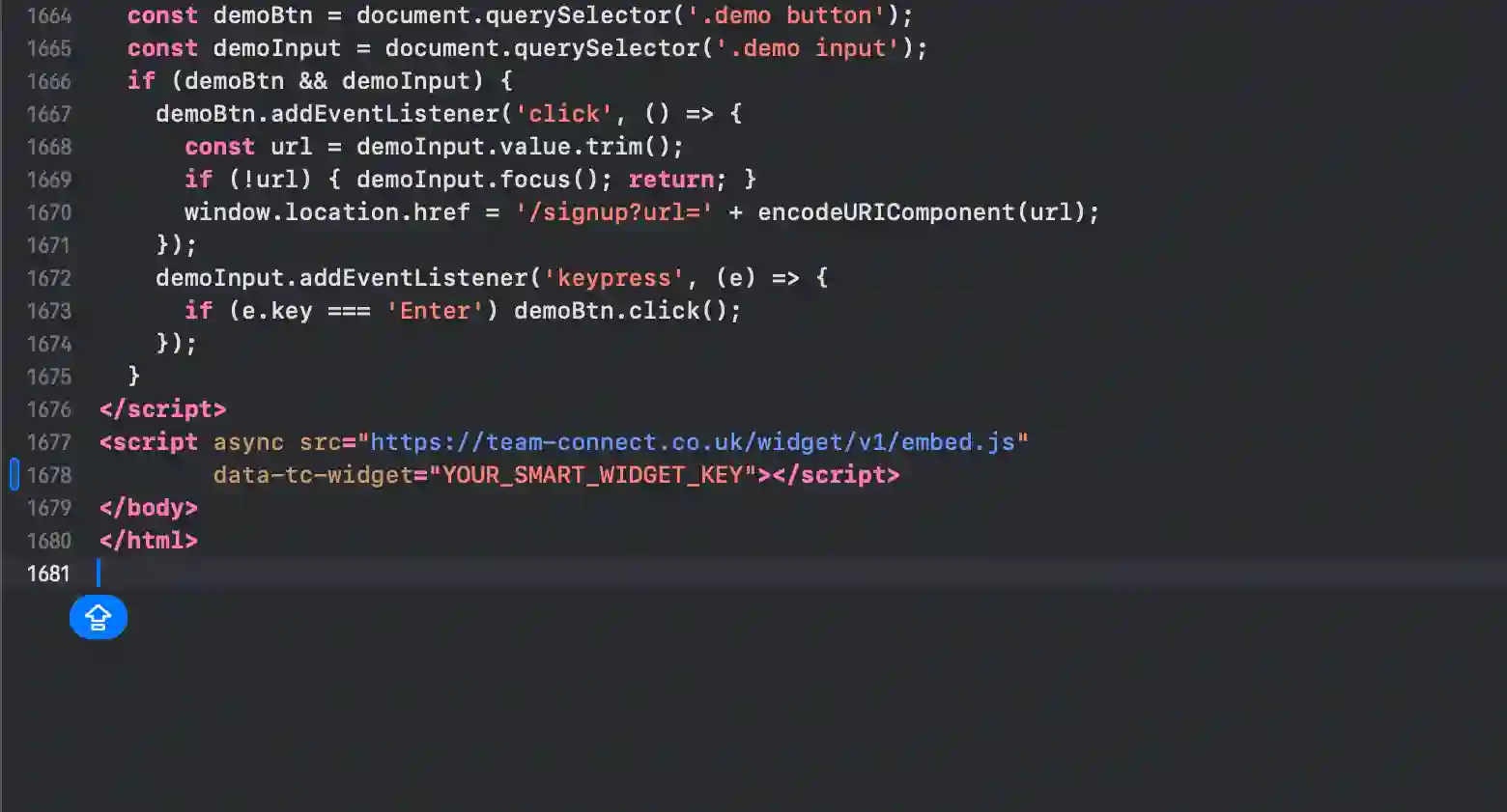
The fastest way to add AI chat to a HTML and static sites site. SmartWidget deploys via a single JavaScript snippet pasted into paste before closing body tag in your HTML. Reads your existing site, configures itself, and goes live in under five minutes. £19/month, no contract, cancel any time.
An AI chat widget for HTML and static sites turns a passive site into an active sales tool. SmartWidget engages every visitor instantly, answers their questions about your services in real time, qualifies the enquiry against your business rules, and either books them in directly or alerts you on SMS when an urgent lead lands. The install is one line of JavaScript pasted into paste before closing body tag in your HTML. Five minutes. £19/mo.
The full install end-to-end. Five steps, about five minutes from signup to the first answered visitor.
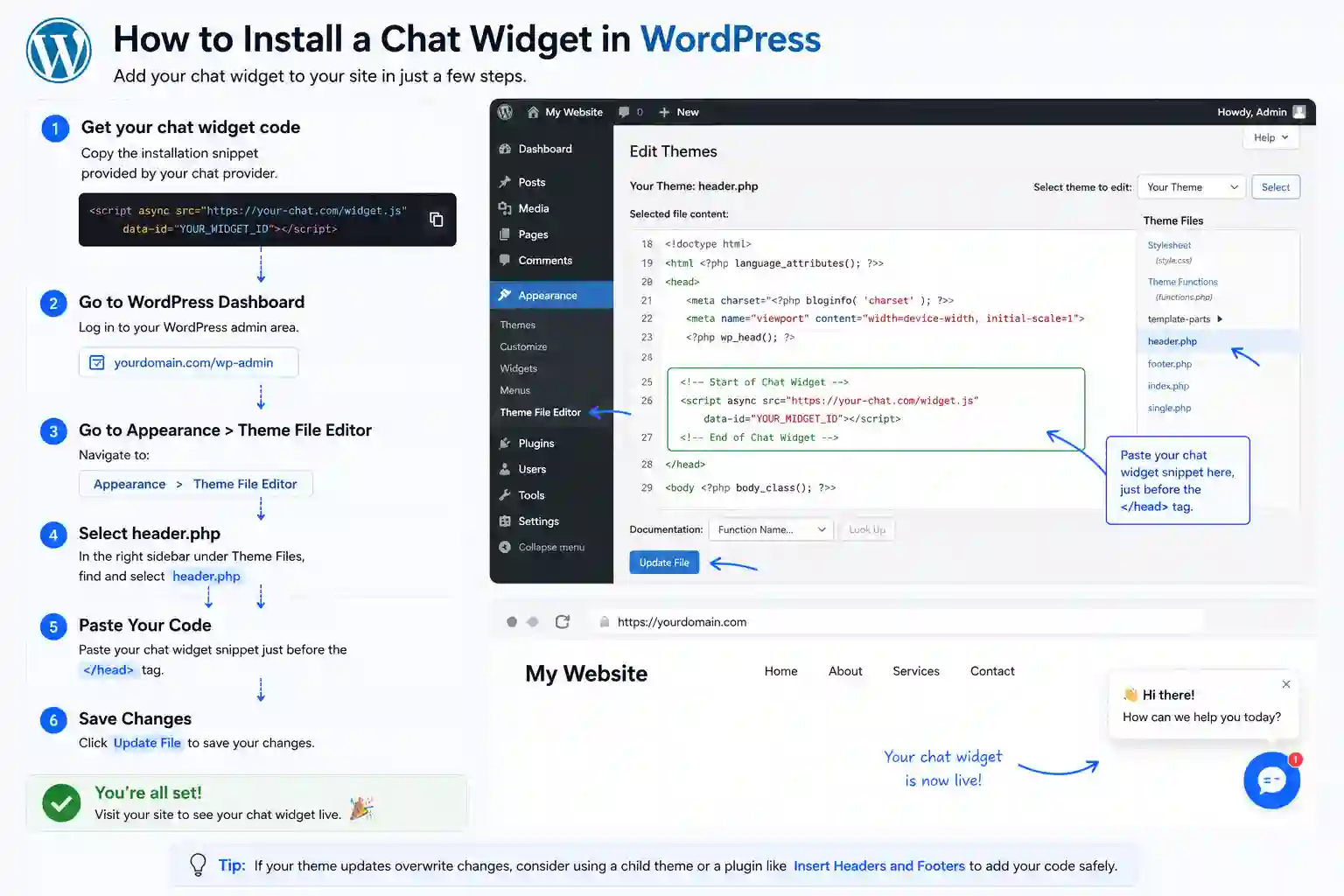
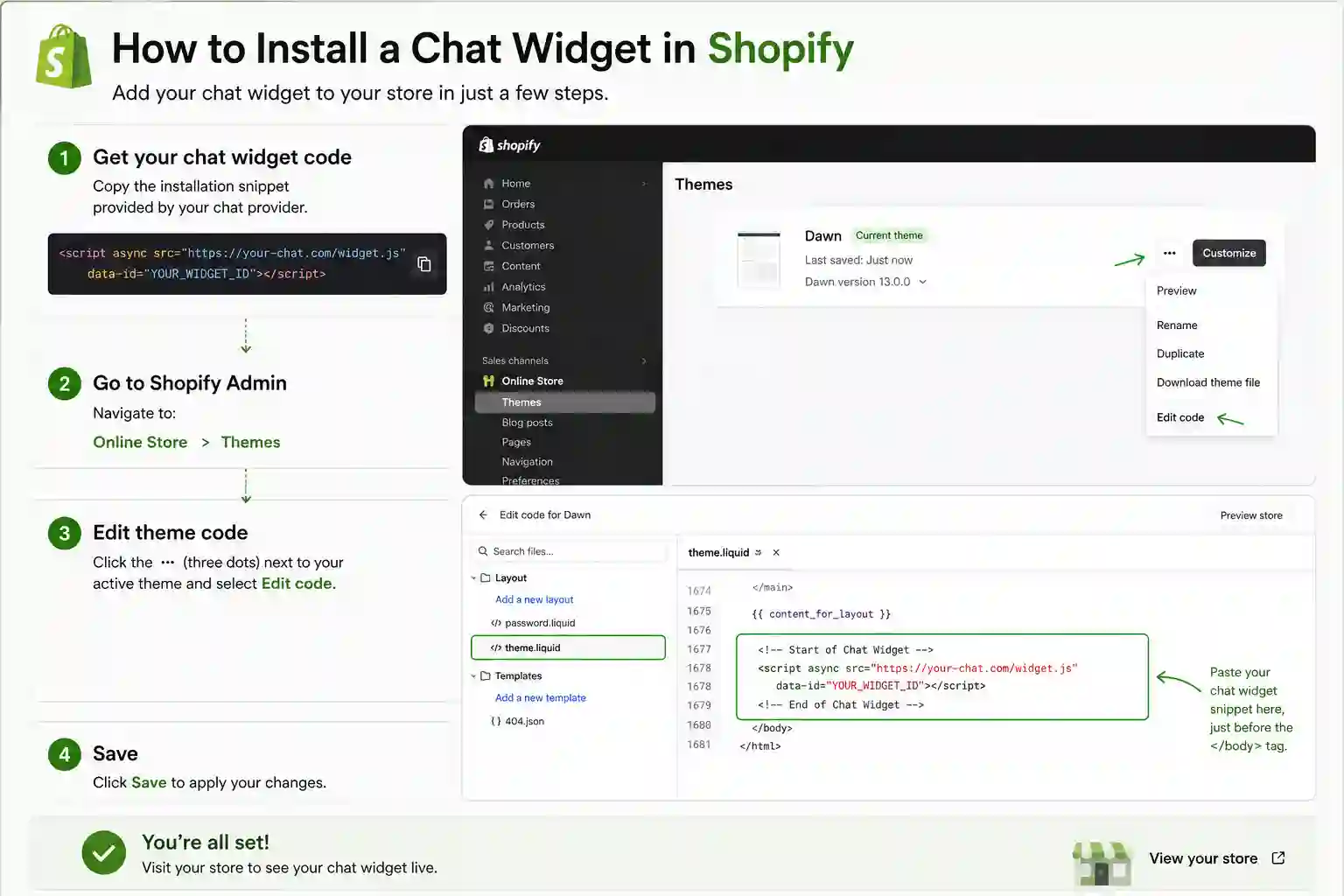
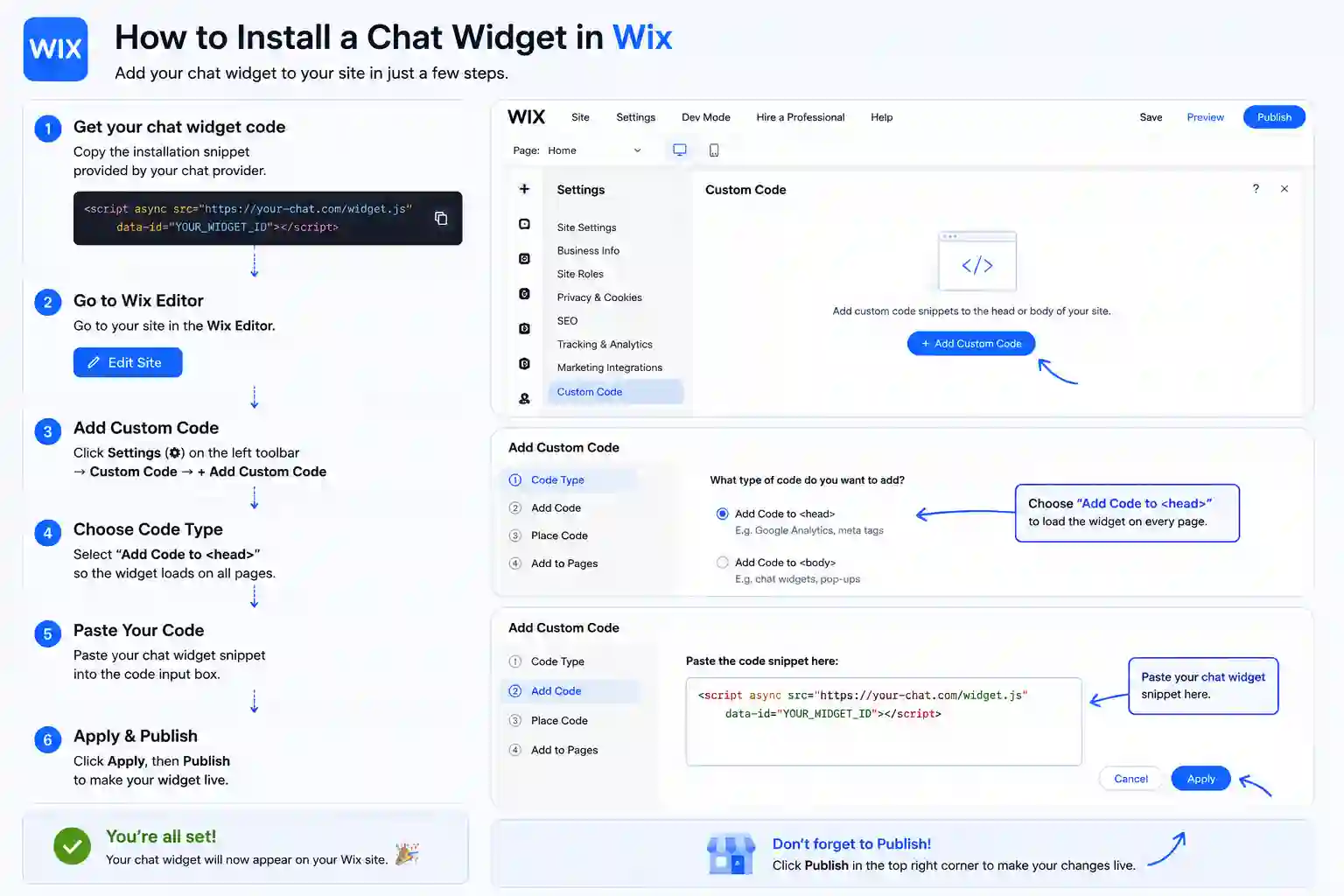
The exact panel and field to paste the snippet on every supported platform. HTML and static sites is highlighted first.
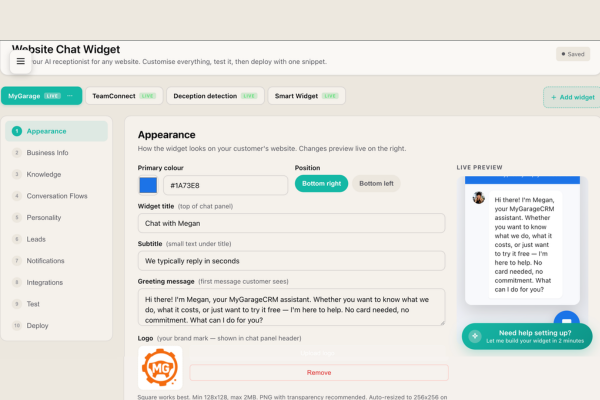
The dashboard reviews and refines what the AI learned from your HTML and static sites site. Every Q&A pair the AI generated is shown with a confidence score. High-confidence answers are auto-approved; lower-confidence ones are flagged for review. You can override any answer, add your own Q&A pairs, and define edge-case rules. The dashboard is structured so a non-technical HTML and static sites site owner can confidently approve the AI's understanding of their business in ten to fifteen minutes.
Owners of HTML and static sites sites typically spend significant effort getting visitors to the site — SEO, ads, content, social. Then those visitors arrive and have no way to engage in real time. The widget is the missing piece. It engages every visitor instantly, qualifies the enquiry, captures the contact details, and alerts you on SMS the moment a high-intent lead lands. Five-minute install on HTML and static sites. From £19/mo.
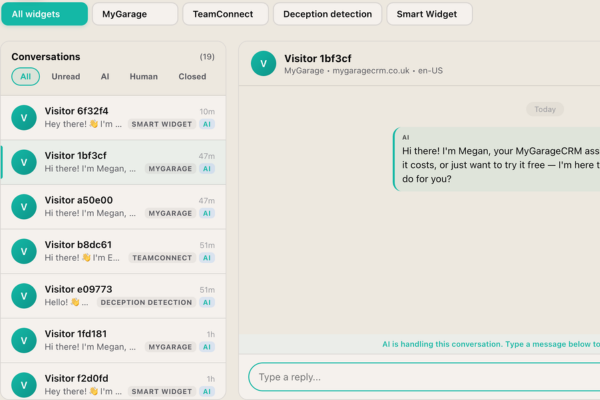
The dashboard you'll spend most of your time in is the messaging inbox. It shows every conversation the AI has on your HTML and static sites site, lets you jump into any live one with one click, and keeps a searchable archive of every conversation the widget has ever had. Visitor contact details from every qualified conversation are captured automatically. Most HTML and static sites businesses check this inbox once a day and the AI handles the rest 24/7.
A live chat app on HTML and static sites needs a human at the other end. A chatbot answers on its own. SmartWidget is a chatbot in the sense that matters — it reads your HTML and static sites site during signup and answers questions about your services, pricing and availability with nobody watching the inbox — but it is not a decision-tree bot with fixed buttons. It reads the question and answers it.
Most HTML and static sites owners switch because live chat software costs more per month and only works during office hours. The chatbot answers at 11pm on a Sunday and emails you the enquiries that need a person.
English, French, German, Spanish, Italian, Dutch and Portuguese are supported on the Growth tier and above. The widget detects the visitor's language from their first message and replies in the same language for the rest of the conversation. Particularly valuable for HTML and static sites sites serving overseas customers or operating in tourism-driven markets.
The dashboard exposes filtering rules. You can block visitors by IP range, exclude conversation triggers on specific URLs of your HTML and static sites site, restrict the widget to certain pages only, and configure honeypot-style anti-spam rules. The defaults are sensible for most HTML and static sites businesses; the controls are there if you need them.
Conversation transcripts and visitor contact data are retained for 30 days after cancellation, then deleted permanently. Within that 30-day window you can export the full transcript archive and the contact database as CSV from the dashboard. The widget snippet on your HTML and static sites site stops loading immediately on cancellation.
No. The widget loads asynchronously after the page has rendered. The bundle is under 30KB. There is no impact on Largest Contentful Paint, Cumulative Layout Shift, or First Input Delay. Lighthouse audit before and after the install on a HTML and static sites site typically shows zero score change.
Yes. The dashboard supports WhatsApp Business API integration for escalations. When the AI flags a high-intent enquiry on your HTML and static sites site, it can send you a WhatsApp message with the visitor's details and the conversation context. The integration runs on top of the standard email and SMS escalation options.
The install on HTML and static sites takes about five minutes end-to-end. You sign up at smartwidget.co.uk, paste your HTML and static sites site URL so the AI can read it, review the auto-generated answers, copy the JavaScript snippet, paste it into paste before closing body tag in your HTML, and save. The widget is live and answering visitors the moment the page saves.
No. The HTML and static sites install is one line of JavaScript pasted into paste before closing body tag in your HTML. If you can navigate your HTML and static sites admin dashboard, you can complete the install. The walkthrough on the SmartWidget dashboard shows the exact menu path for HTML and static sites with screenshots.
No. SmartWidget loads asynchronously and isolates its CSS inside a Shadow DOM, so it cannot affect your HTML and static sites theme's styling, animations, or layout. It also does not block page rendering. Lighthouse and PageSpeed scores are unaffected.
Yes for any HTML and static sites plan that lets you paste a script tag or custom JavaScript into paste before closing body tag in your HTML. On a small number of HTML and static sites entry-level tiers the custom code feature is restricted; in that case upgrading to the next plan unlocks it. Most HTML and static sites Business or Pro tiers and above support SmartWidget directly.
No. There is no plugin for HTML and static sites. SmartWidget installs via a single line of JavaScript pasted directly into paste before closing body tag in your HTML. Avoiding the plugin route means fewer dependencies, zero conflicts with your other HTML and static sites extensions, and no plugin marketplace approval process.
A single script tag with your unique widget key. Around 200 characters total. You copy it from the SmartWidget dashboard after signup, paste it into paste before closing body tag in your HTML, and save. The script tag loads our widget client asynchronously when a visitor lands on your page.
No. The widget loads asynchronously after the page has rendered, so it does not block any of your HTML and static sites site's critical rendering path. PageSpeed and Lighthouse scores are unaffected. The widget bundle is under 30 KB and lazy-loads its UI when the visitor first interacts with the chat bubble.
SmartWidget is UK GDPR compliant by design. Conversation transcripts are encrypted at rest in UK-based data centres. The widget includes a configurable consent notice that integrates with most HTML and static sites cookie banner solutions, and the dashboard exposes the controls needed for data-subject access and deletion requests.
Yes. The widget appearance is fully customisable from the SmartWidget dashboard — primary colour, accent colour, chat bubble position (bottom-left, bottom-right), avatar, welcome message, and trigger behaviour. The customisation is centralised, so changing it once updates the widget on your HTML and static sites site immediately.
4.9 out of 5 from 199 reviews. A selection of install-experience reviews from real UK businesses.
We run a WooCommerce store with twelve plugins already. I worried about JavaScript conflicts. The install was a single line in the footer and there have been zero conflicts in eight weeks live.
We host our own static site built with Eleventy and deploy via Netlify. SmartWidget is a single script tag in the base layout. Build pipeline rebuilt automatically. Live in nine minutes total.
The compliance review took longer than the install. Our IT director approved the JavaScript snippet in ten minutes and confirmed it loads async with no client data exposure. Install itself was four minutes.
My Weebly site is the cheapest plan that still allows custom code. SmartWidget installed via the SEO footer code field in five minutes. Now capturing weekend enquiries that used to go to voicemail.
My Carrd single-page site had no good chat tool option until SmartWidget. The install was the body embed field in Carrd settings. Six minutes from signup to my first answered visitor enquiry on the same evening.
Across roughly forty client sites the install is exactly the same — paste one line, configure tone, hand back to the client. The agency dashboard handles all forty from one inbox. Two clicks per onboard.
SmartWidget installs cleanly on every major platform in this category. Explore install guides for related platforms.
Sign up, paste the snippet, save. From £19 a month, no contract.