
My Strikingly site does not support most chat widgets I tried. SmartWidget installed via the advanced footer HTML field cleanly and the widget appears on every page including the single-page sections.
Strikingly-compatible
Also searched as a Instapage chat widget, chat app, live chat plugin or AI chatbot — same tool, one five-minute install.
This is the working install guide for adding SmartWidget to a UK Instapage site. Everything from signup to first answered visitor, with the exact menu path for Page Settings > Javascript > Footer and the verification checklist that confirms the widget is live. From £19/mo.
An AI chat widget for Instapage replaces three pieces of legacy site tooling at once: the contact form that nobody replies to, the live chat that only works in business hours, and the FAQ page visitors never read. SmartWidget on Instapage handles all three jobs from a single line of JavaScript pasted into Page Settings > Javascript > Footer. It reads your site, builds the knowledge base, and goes live in five minutes. From £19/month, no contract.
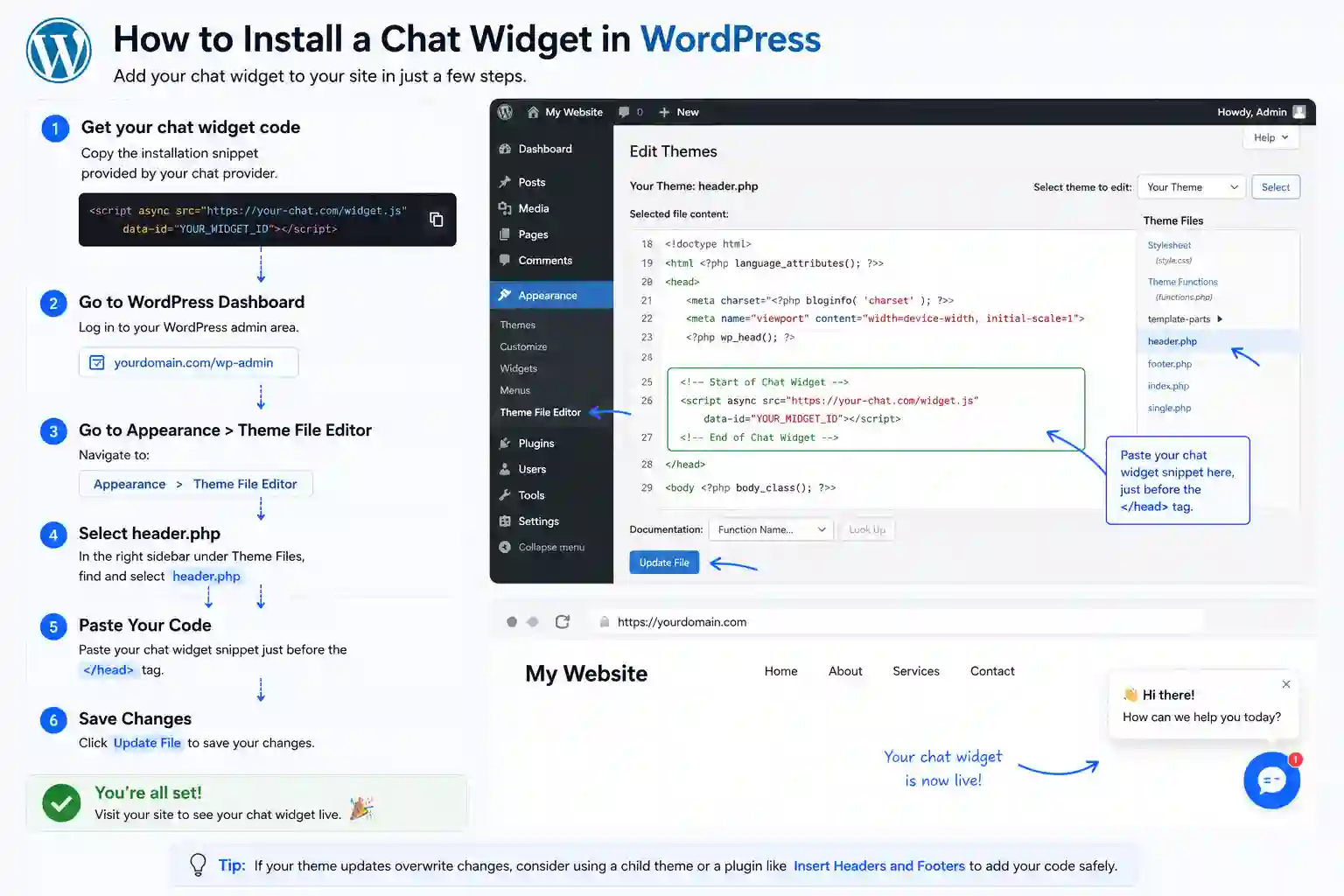
The full install end-to-end. Five steps, about five minutes from signup to the first answered visitor.
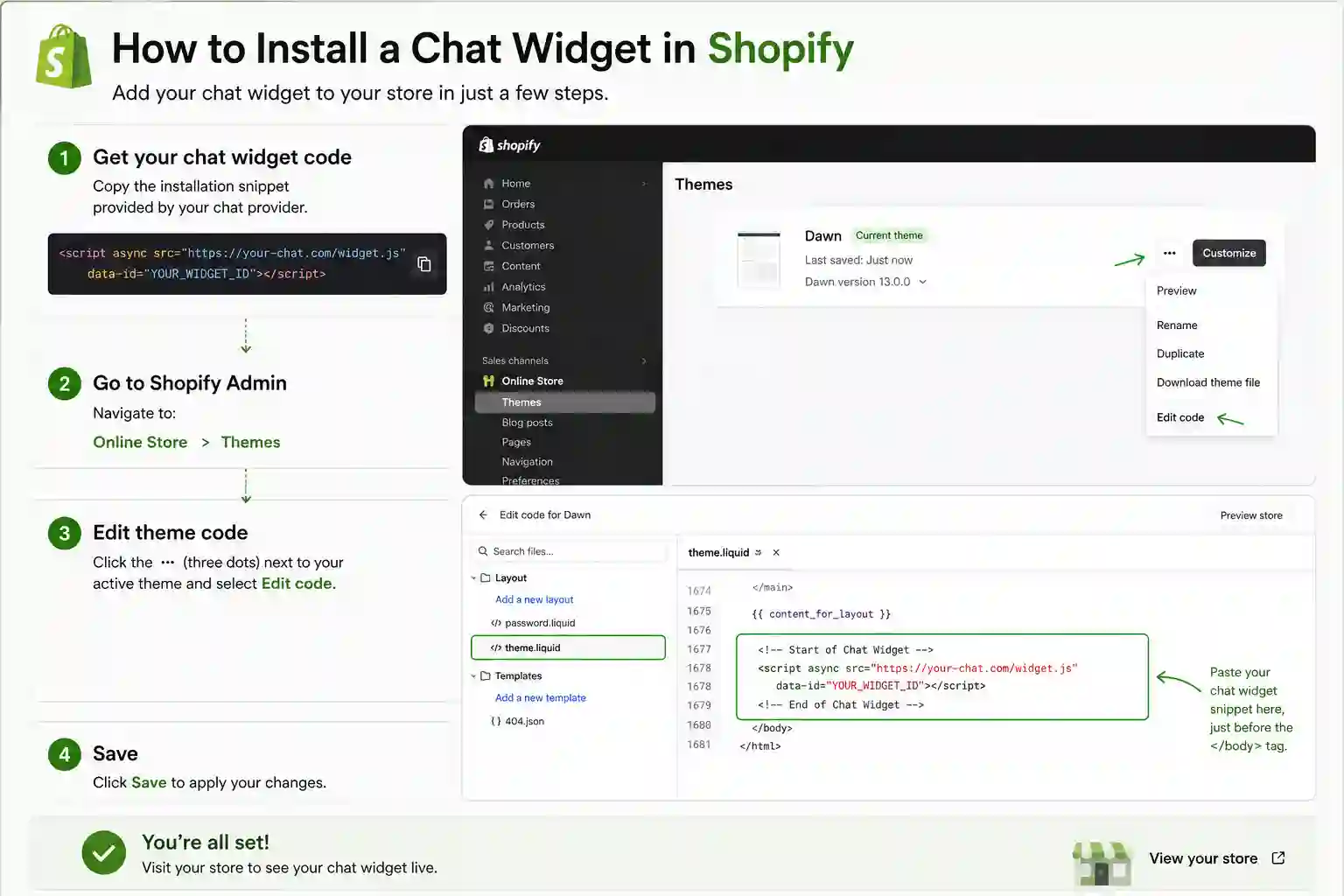
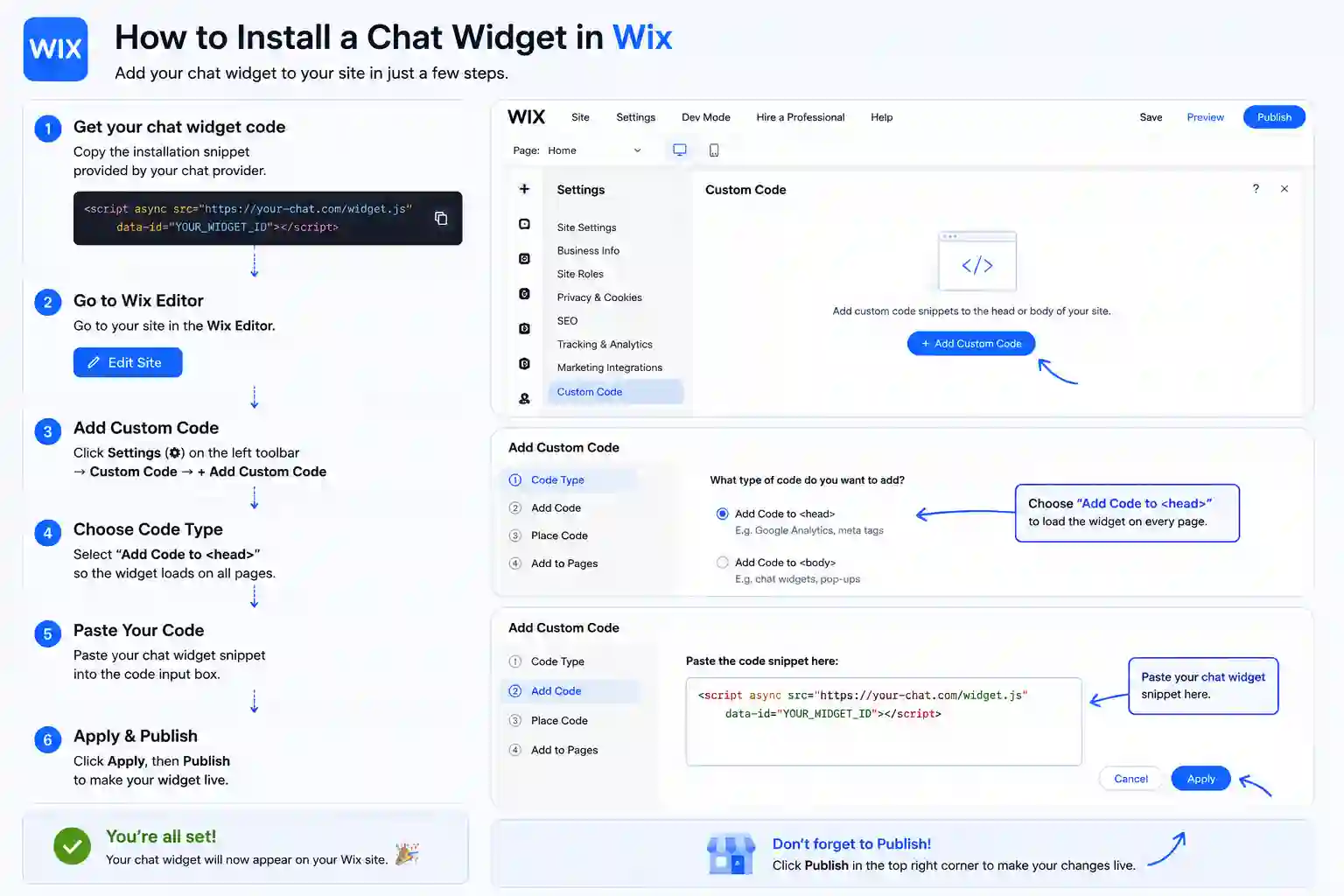
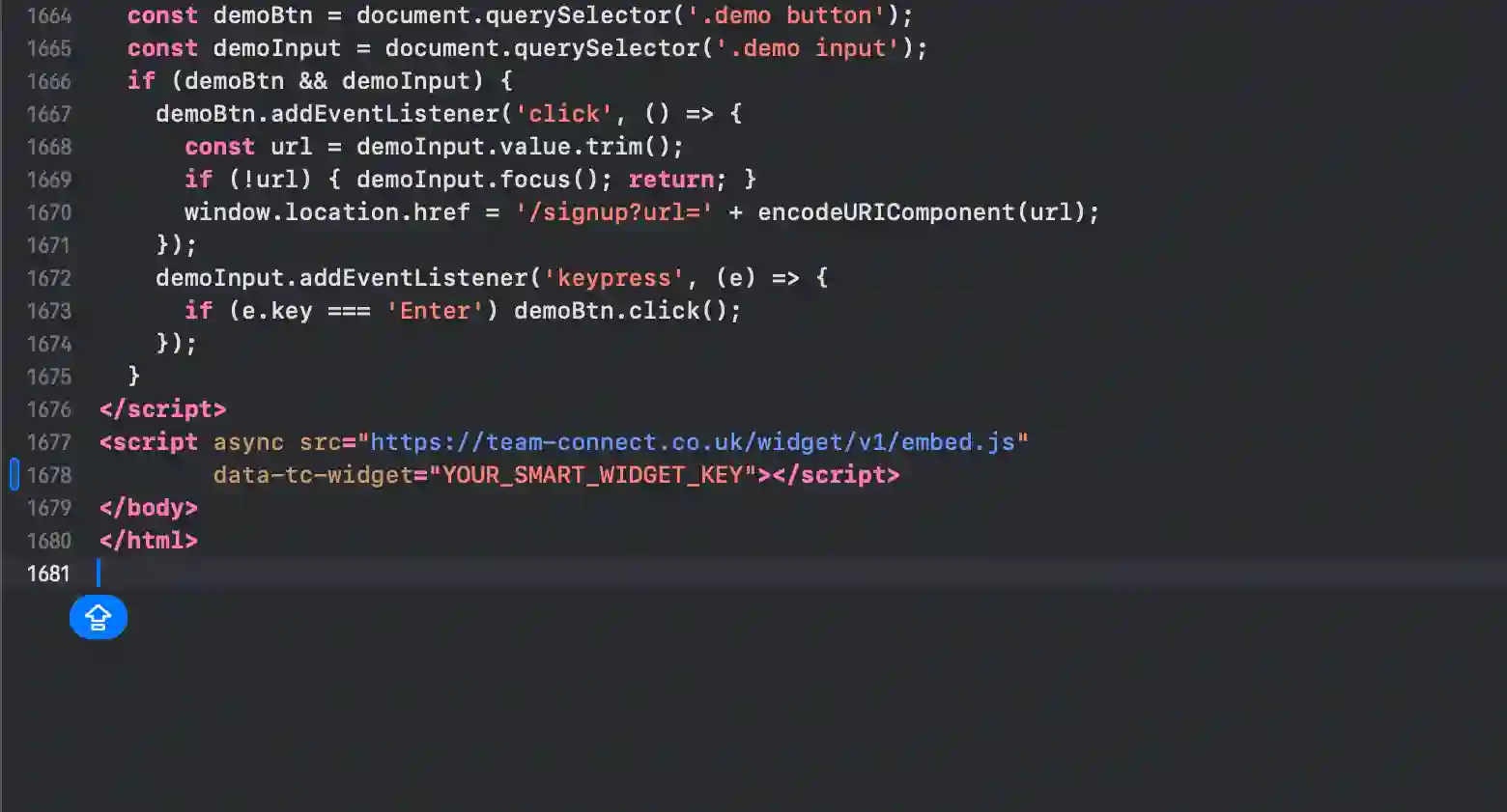
The exact panel and field to paste the snippet on every supported platform. Instapage is highlighted first.
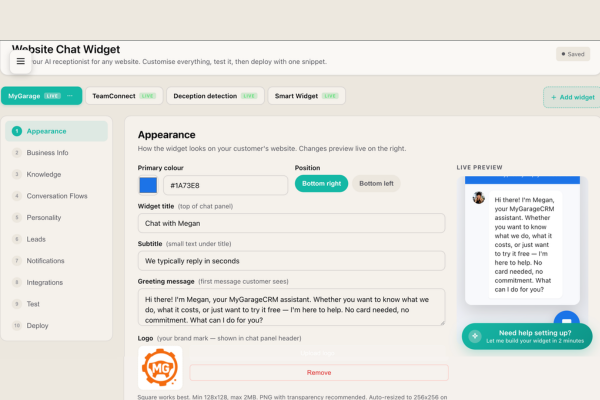
This dashboard is where the AI receptionist on your Instapage site gets its personality. Beyond the knowledge base, the dashboard exposes tone-of-voice controls (formal, conversational, transactional), language settings, escalation triggers, integration with your Instapage calendar and email, and the visible widget appearance (colours, position, welcome message). The same dashboard scales from a single Instapage site to dozens — agencies running multiple client Instapage sites use it daily.
Instapage gives you a beautiful site, but it doesn't give you a way to engage visitors in real time. That's a conversion-rate gap. Visitors arrive interested, can't get an immediate answer, and leave. SmartWidget closes that gap with a single line of JavaScript pasted into Page Settings > Javascript > Footer. From that moment on, every visitor gets an answer in under eight seconds and every qualified enquiry gets a contact-card-and-SMS handover to you.
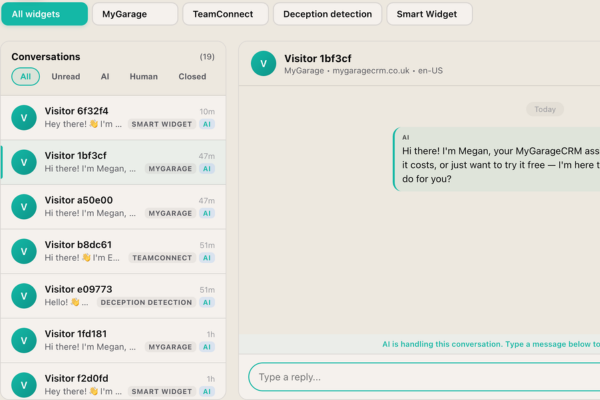
Every conversation the SmartWidget AI has on your Instapage site lands in this unified inbox. Live conversations are shown in real time. Completed conversations are kept indexed and searchable. You can jump into any live conversation with a single click — the AI steps back, you type as a human, the visitor sees the same chat thread continue. The handover is seamless from the visitor's side. The inbox is the operational heart of running the widget on a Instapage site.
A live chat app on Instapage needs a human at the other end. A chatbot answers on its own. SmartWidget is a chatbot in the sense that matters — it reads your Instapage site during signup and answers questions about your services, pricing and availability with nobody watching the inbox — but it is not a decision-tree bot with fixed buttons. It reads the question and answers it.
Most Instapage owners switch because live chat software costs more per month and only works during office hours. The chatbot answers at 11pm on a Sunday and emails you the enquiries that need a person.
The install on Instapage takes about five minutes end-to-end. You sign up at smartwidget.co.uk, paste your Instapage site URL so the AI can read it, review the auto-generated answers, copy the JavaScript snippet, paste it into Page Settings > Javascript > Footer, and save. The widget is live and answering visitors the moment the page saves.
No. The Instapage install is one line of JavaScript pasted into Page Settings > Javascript > Footer. If you can navigate your Instapage admin dashboard, you can complete the install. The walkthrough on the SmartWidget dashboard shows the exact menu path for Instapage with screenshots.
No. SmartWidget loads asynchronously and isolates its CSS inside a Shadow DOM, so it cannot affect your Instapage theme's styling, animations, or layout. It also does not block page rendering. Lighthouse and PageSpeed scores are unaffected.
Yes for any Instapage plan that lets you paste a script tag or custom JavaScript into Page Settings > Javascript > Footer. On a small number of Instapage entry-level tiers the custom code feature is restricted; in that case upgrading to the next plan unlocks it. Most Instapage Business or Pro tiers and above support SmartWidget directly.
No. There is no plugin for Instapage. SmartWidget installs via a single line of JavaScript pasted directly into Page Settings > Javascript > Footer. Avoiding the plugin route means fewer dependencies, zero conflicts with your other Instapage extensions, and no plugin marketplace approval process.
A single script tag with your unique widget key. Around 200 characters total. You copy it from the SmartWidget dashboard after signup, paste it into Page Settings > Javascript > Footer, and save. The script tag loads our widget client asynchronously when a visitor lands on your page.
No. The widget loads asynchronously after the page has rendered, so it does not block any of your Instapage site's critical rendering path. PageSpeed and Lighthouse scores are unaffected. The widget bundle is under 30 KB and lazy-loads its UI when the visitor first interacts with the chat bubble.
SmartWidget is UK GDPR compliant by design. Conversation transcripts are encrypted at rest in UK-based data centres. The widget includes a configurable consent notice that integrates with most Instapage cookie banner solutions, and the dashboard exposes the controls needed for data-subject access and deletion requests.
Yes. The widget appearance is fully customisable from the SmartWidget dashboard — primary colour, accent colour, chat bubble position (bottom-left, bottom-right), avatar, welcome message, and trigger behaviour. The customisation is centralised, so changing it once updates the widget on your Instapage site immediately.
Remove the single line of JavaScript from Page Settings > Javascript > Footer and save. The widget disappears immediately. There is nothing else to uninstall from Instapage — no database tables, no orphaned files, no leftover configuration.
Yes. Multi-site is built in from the Growth tier. One SmartWidget subscription can run widgets across multiple Instapage sites, each with its own AI personality, knowledge base and unified inbox. Particularly useful for agencies running client Instapage sites or operators with multiple brand sites.
Yes. The widget is responsive by default and works on every Instapage mobile breakpoint. The chat bubble sits in the bottom corner on every screen size and the chat interface adapts to mobile-optimised layout when a visitor opens it on a phone.
Yes. The widget integrates with Google Calendar, Outlook (Microsoft Graph), and the built-in SmartWidget scheduler. Visitors browsing your Instapage site can be offered specific appointment slots and book directly inside the chat. The event writes back to your calendar with the conversation transcript attached.
A small number of Instapage entry-level tiers restrict custom code. In that case, upgrading to a tier that allows custom JavaScript is the only path. If Instapage does not allow custom code on any tier, SmartWidget cannot be installed — but this is rare. Almost every modern Instapage Business or Pro plan supports it.
4.9 out of 5 from 199 reviews. A selection of install-experience reviews from real UK businesses.
My Strikingly site does not support most chat widgets I tried. SmartWidget installed via the advanced footer HTML field cleanly and the widget appears on every page including the single-page sections.
My BigCommerce store and my WordPress information site needed one chat widget across both. SmartWidget Multi-Site handles both with separate knowledge bases. One subscription, two installs, identical experience.
My Pixieset client gallery site does not support most chat tools. SmartWidget installed via the custom code tracking field with zero modification needed. The widget appears only on the public site, not the client galleries.
My site is on Wix and the developer who built it is no longer around. SmartWidget gave me copy-paste instructions for the Wix custom code section. Live in seven minutes.
My BigCommerce store has six payment processors and four tracking scripts. I expected another script tag to cause problems. It did not. The widget loads asynchronously and does not block anything on the page.
My GoDaddy site was the third platform we tried — none of the chat tools we previously bought worked on it. SmartWidget installed via the HTML section block in twelve minutes and has been running clean since.
SmartWidget installs cleanly on every major platform in this category. Explore install guides for related platforms.
Sign up, paste the snippet, save. From £19 a month, no contract.