
My site is on Wix and the developer who built it is no longer around. SmartWidget gave me copy-paste instructions for the Wix custom code section. Live in seven minutes.
7-min Wix install
Also searched as a Next.js chat widget, chat app, live chat plugin or AI chatbot — same tool, one five-minute install.
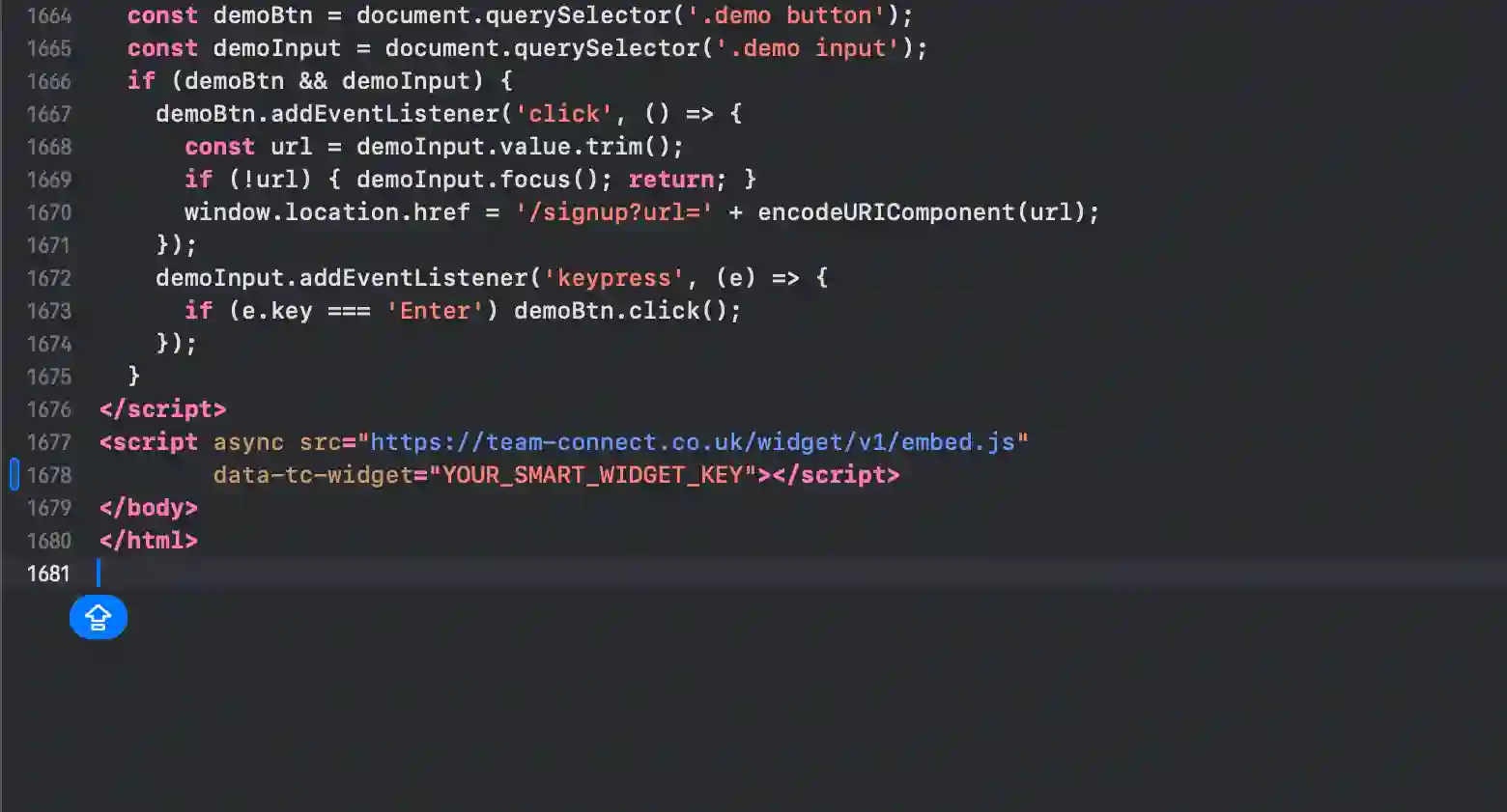
This is the complete guide to installing SmartWidget on Next.js. Step-by-step from signup to first answered visitor, including the exact paste location for the snippet in _app.tsx or _document.tsx body block, customisation options, and GDPR cookie integration. From £19/mo.
An AI chat widget for Next.js gives every visitor an answer the moment they land. SmartWidget reads your Next.js site, builds an AI receptionist trained on your services and pricing, and deploys via a single script tag pasted into _app.tsx or _document.tsx body block. The setup takes five minutes end-to-end. Once live, the widget answers visitor questions 24/7, captures contact details on every qualified enquiry, and alerts you by email or SMS the moment a high-intent lead lands.
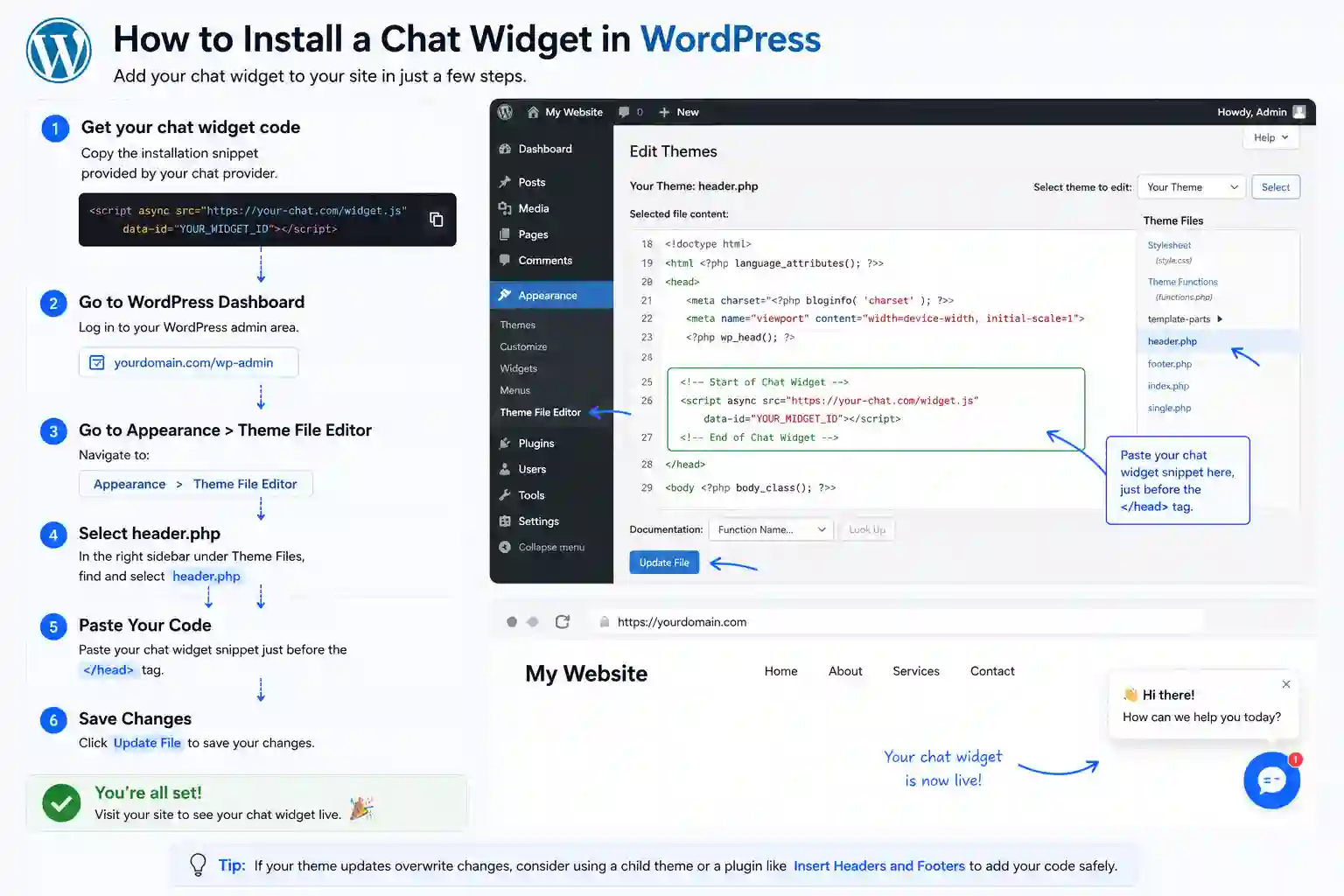
The full install end-to-end. Five steps, about five minutes from signup to the first answered visitor.
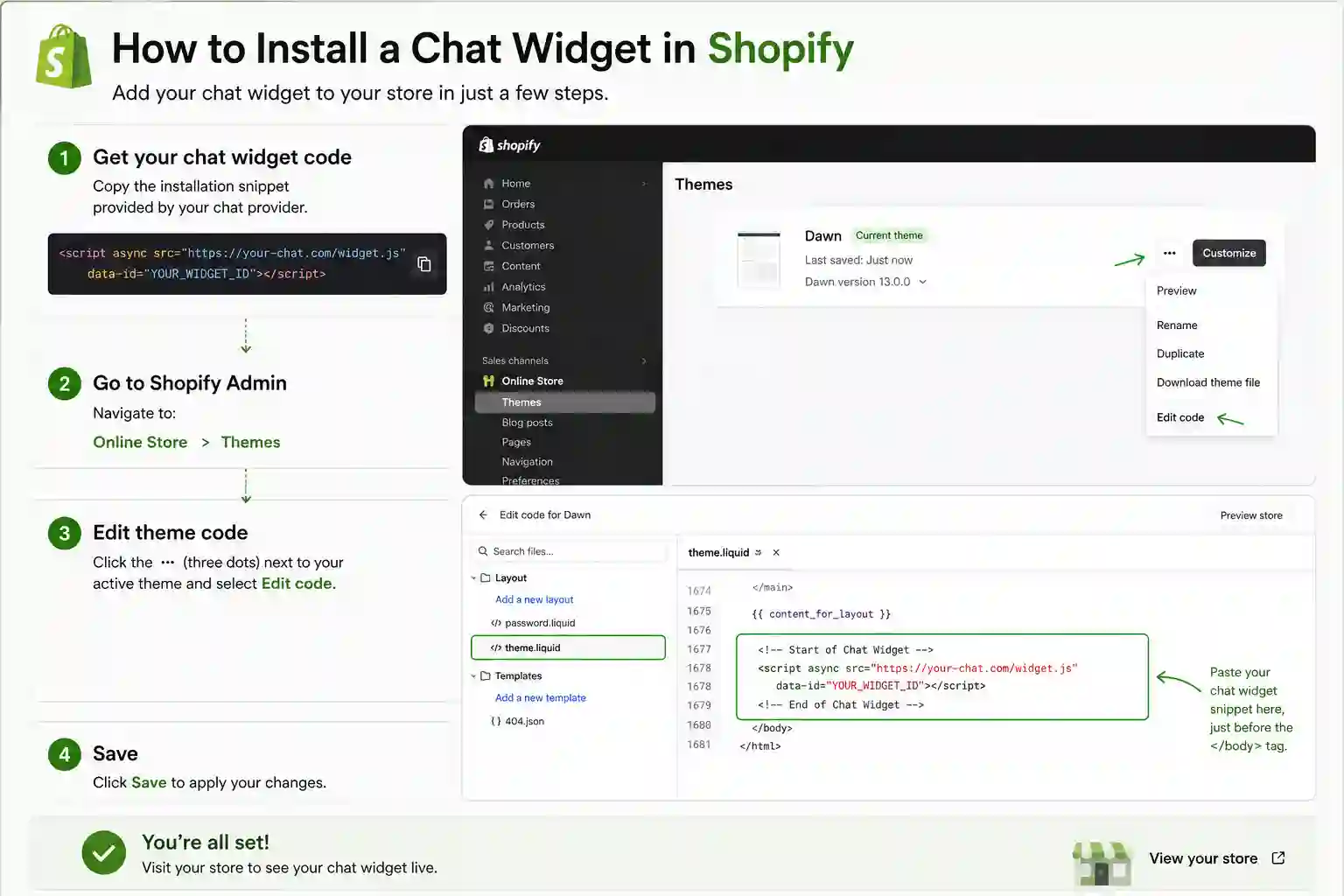
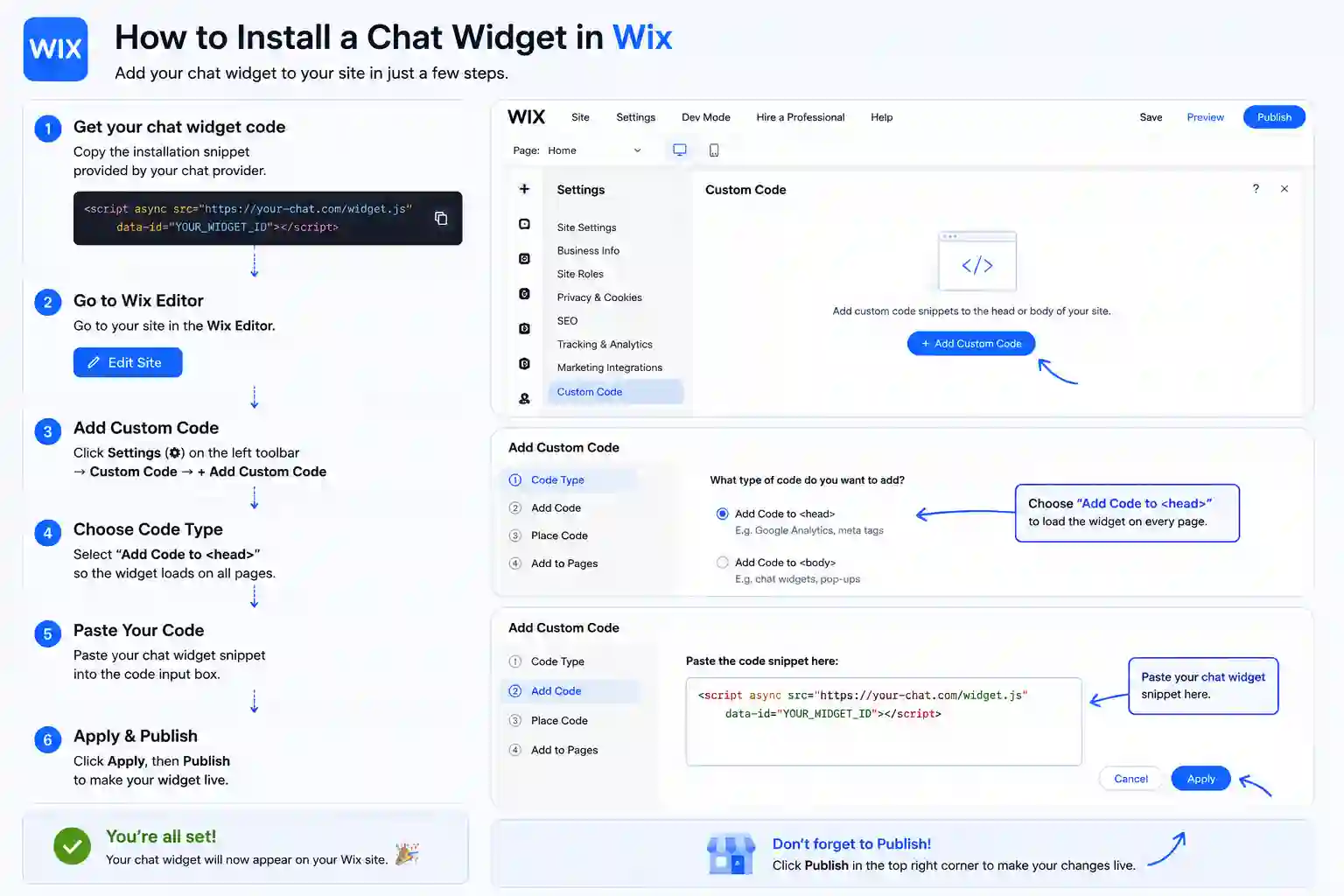
The exact panel and field to paste the snippet on every supported platform. Next.js is highlighted first.
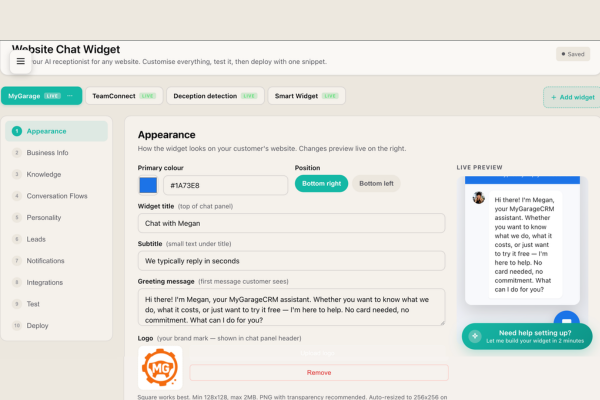
This is what you'll see when you sign up SmartWidget for your Next.js site. The dashboard organises everything the AI knows about your business into editable sections — services, pricing, opening hours, locations, qualifying questions, FAQ overrides. The AI populates these from reading your Next.js site automatically, then you review and refine. Most Next.js businesses spend ten minutes here on day one, then check in weekly to add new Q&A pairs as customer questions evolve.
The reason an AI chat widget matters so much on Next.js is that Next.js sites typically rely entirely on a contact form for visitor enquiries. Contact forms get a single-digit response rate. Visitors fill the form, never get a reply, and tab to a competitor. The widget engages every visitor at the moment of arrival — answers their question, qualifies the enquiry, captures the contact details, and alerts you on SMS. The conversion uplift on the same traffic is typically twofold.
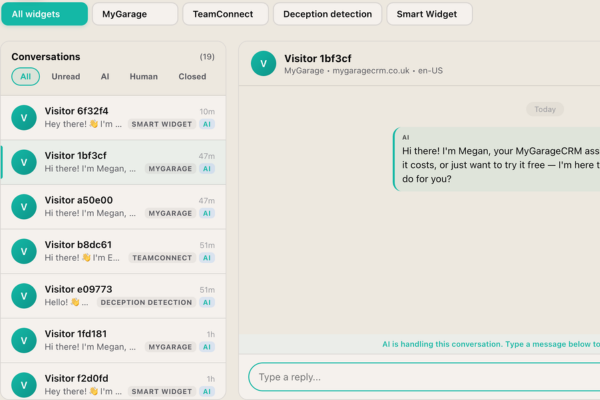
This is the inbox you'll use to manage every visitor conversation from your Next.js site. The AI handles most conversations end-to-end without human involvement, but the ones that matter — high-value enquiries, complex questions, urgent issues — are flagged for your attention. SMS alerts ping your mobile the moment a qualified lead lands. The inbox shows every conversation with full transcript, visitor metadata, and a single-click handover button.
A live chat app on Next.js needs a human at the other end. A chatbot answers on its own. SmartWidget is a chatbot in the sense that matters — it reads your Next.js site during signup and answers questions about your services, pricing and availability with nobody watching the inbox — but it is not a decision-tree bot with fixed buttons. It reads the question and answers it.
Most Next.js owners switch because live chat software costs more per month and only works during office hours. The chatbot answers at 11pm on a Sunday and emails you the enquiries that need a person.
No. The widget loads asynchronously after the page has rendered, so it does not block any of your Next.js site's critical rendering path. PageSpeed and Lighthouse scores are unaffected. The widget bundle is under 30 KB and lazy-loads its UI when the visitor first interacts with the chat bubble.
SmartWidget is UK GDPR compliant by design. Conversation transcripts are encrypted at rest in UK-based data centres. The widget includes a configurable consent notice that integrates with most Next.js cookie banner solutions, and the dashboard exposes the controls needed for data-subject access and deletion requests.
Yes. The widget appearance is fully customisable from the SmartWidget dashboard — primary colour, accent colour, chat bubble position (bottom-left, bottom-right), avatar, welcome message, and trigger behaviour. The customisation is centralised, so changing it once updates the widget on your Next.js site immediately.
Remove the single line of JavaScript from _app.tsx or _document.tsx body block and save. The widget disappears immediately. There is nothing else to uninstall from Next.js — no database tables, no orphaned files, no leftover configuration.
Yes. Multi-site is built in from the Growth tier. One SmartWidget subscription can run widgets across multiple Next.js sites, each with its own AI personality, knowledge base and unified inbox. Particularly useful for agencies running client Next.js sites or operators with multiple brand sites.
Yes. The widget is responsive by default and works on every Next.js mobile breakpoint. The chat bubble sits in the bottom corner on every screen size and the chat interface adapts to mobile-optimised layout when a visitor opens it on a phone.
Yes. The widget integrates with Google Calendar, Outlook (Microsoft Graph), and the built-in SmartWidget scheduler. Visitors browsing your Next.js site can be offered specific appointment slots and book directly inside the chat. The event writes back to your calendar with the conversation transcript attached.
A small number of Next.js entry-level tiers restrict custom code. In that case, upgrading to a tier that allows custom JavaScript is the only path. If Next.js does not allow custom code on any tier, SmartWidget cannot be installed — but this is rare. Almost every modern Next.js Business or Pro plan supports it.
No. SmartWidget operates on monthly billing with no contract and no minimum commitment. Cancel any time directly from the dashboard with no notice period and no exit fee. The lowest tier is £19 per month, billed monthly, so the maximum risk on the decision is a single month's spend.
Live chat support inside the SmartWidget dashboard answers within minutes. The dashboard also contains a step-by-step Next.js-specific install guide with screenshots and the exact menu paths. If the install does not work, support will remote into a screenshare and complete it with you.
The widget includes a configurable consent notice that integrates with the major UK cookie banner solutions including OneTrust, Cookiebot, CookieYes, Iubenda, and the platform-native banners on Next.js where available. Consent state is respected — the widget does not initialise until consent has been granted on visitors in scope of UK GDPR.
The AI knowledge base is built from publicly accessible pages on your Next.js site. Content gated behind login is not included automatically. If your Next.js site has paid-content or member-only sections, the AI's knowledge will reflect only the public pages — which is typically what you want for visitor chat anyway.
English, French, German, Spanish, Italian, Dutch and Portuguese are supported on the Growth tier and above. The widget detects the visitor's language from their first message and replies in the same language for the rest of the conversation. Particularly valuable for Next.js sites serving overseas customers or operating in tourism-driven markets.
The dashboard exposes filtering rules. You can block visitors by IP range, exclude conversation triggers on specific URLs of your Next.js site, restrict the widget to certain pages only, and configure honeypot-style anti-spam rules. The defaults are sensible for most Next.js businesses; the controls are there if you need them.
4.9 out of 5 from 199 reviews. A selection of install-experience reviews from real UK businesses.
My site is on Wix and the developer who built it is no longer around. SmartWidget gave me copy-paste instructions for the Wix custom code section. Live in seven minutes.
My BigCommerce store has six payment processors and four tracking scripts. I expected another script tag to cause problems. It did not. The widget loads asynchronously and does not block anything on the page.
My GoDaddy site was the third platform we tried — none of the chat tools we previously bought worked on it. SmartWidget installed via the HTML section block in twelve minutes and has been running clean since.
My Strikingly site does not support most chat widgets I tried. SmartWidget installed via the advanced footer HTML field cleanly and the widget appears on every page including the single-page sections.
My BigCommerce store and my WordPress information site needed one chat widget across both. SmartWidget Multi-Site handles both with separate knowledge bases. One subscription, two installs, identical experience.
My Pixieset client gallery site does not support most chat tools. SmartWidget installed via the custom code tracking field with zero modification needed. The widget appears only on the public site, not the client galleries.
SmartWidget installs cleanly on every major platform in this category. Explore install guides for related platforms.
Sign up, paste the snippet, save. From £19 a month, no contract.