
My Format portfolio is built around lots of high-resolution images and very minimal text. SmartWidget did not slow the gallery load at all — it loads async and the widget bubble only renders once images are done.
Image-site safe
Also searched as a Hostinger Website Builder chat widget, chat app, live chat plugin or AI chatbot — same tool, one five-minute install.
This is the complete guide to installing SmartWidget on Hostinger Website Builder. Step-by-step from signup to first answered visitor, including the exact paste location for the snippet in Settings > Code Injection > Body, customisation options, and GDPR cookie integration. From £19/mo.
SmartWidget is an AI chat widget for Hostinger Website Builder sites. It installs via a single line of JavaScript pasted into Settings > Code Injection > Body, reads your existing Hostinger Website Builder site automatically to build its knowledge base, and answers visitor questions in under eight seconds. No plugin to install on Hostinger Website Builder, no theme modification beyond pasting the snippet, no engineer required. The widget is configured per business — your services, your prices, your tone of voice — all learned from your site during setup. From £19 a month.
The full install end-to-end. Five steps, about five minutes from signup to the first answered visitor.
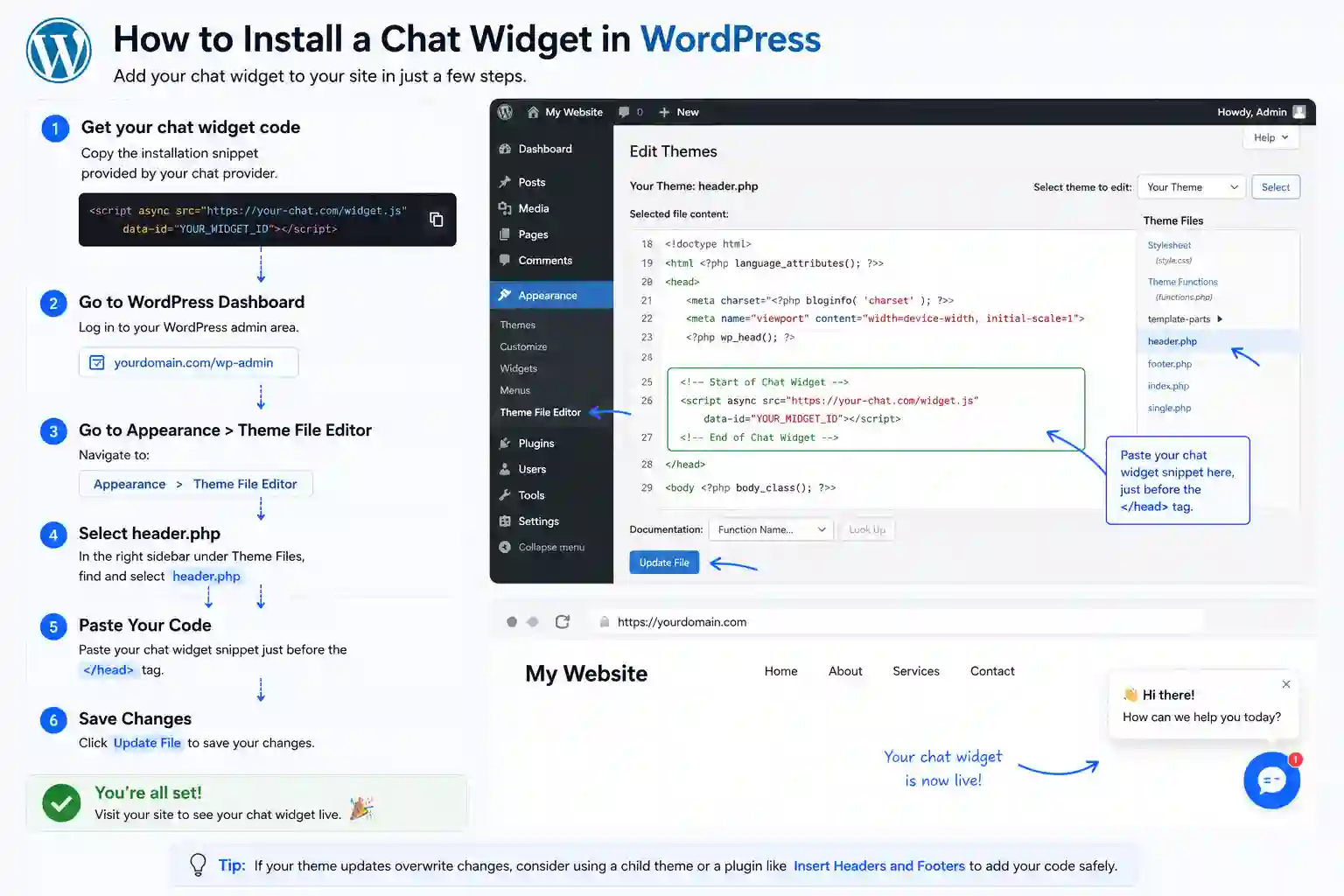
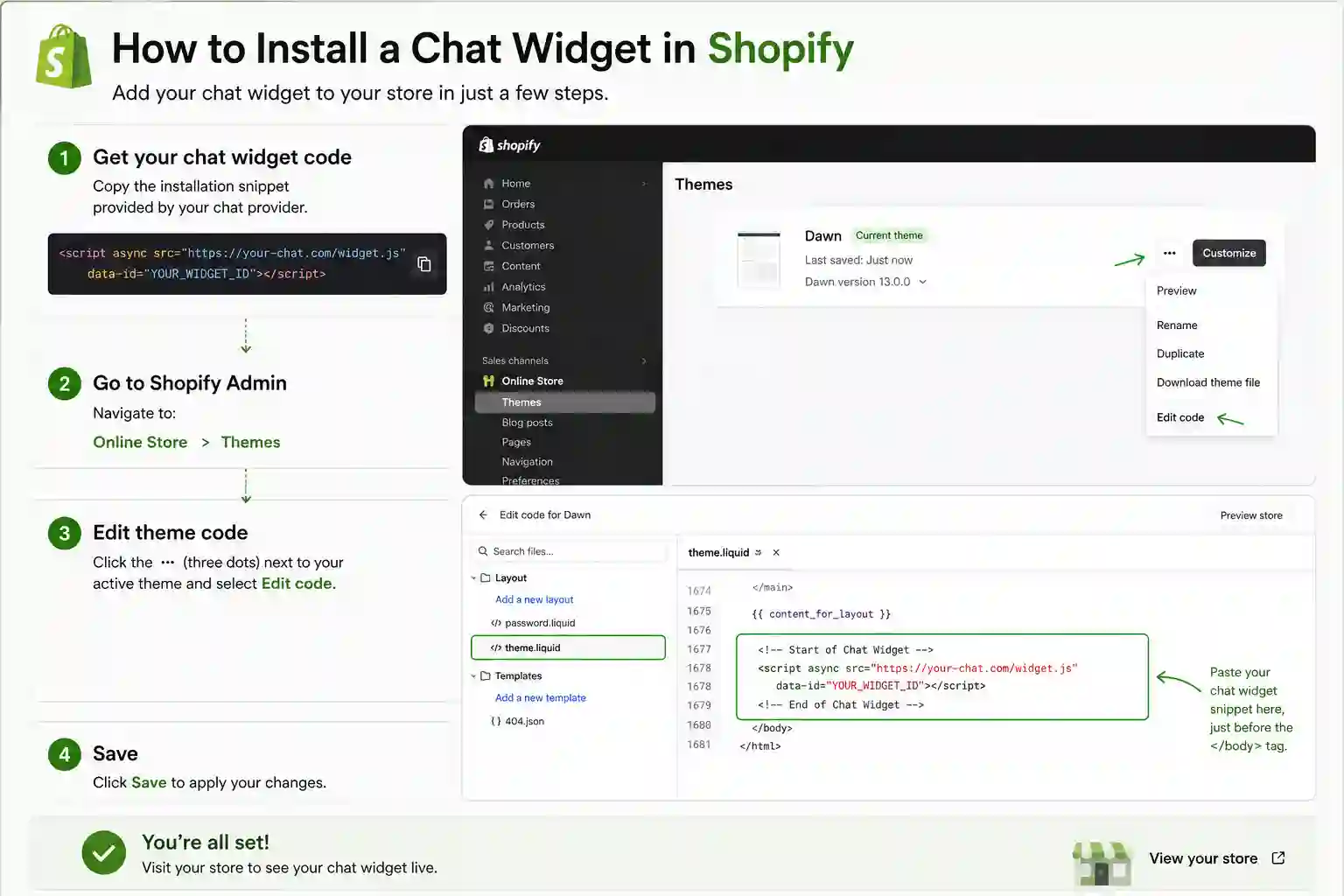
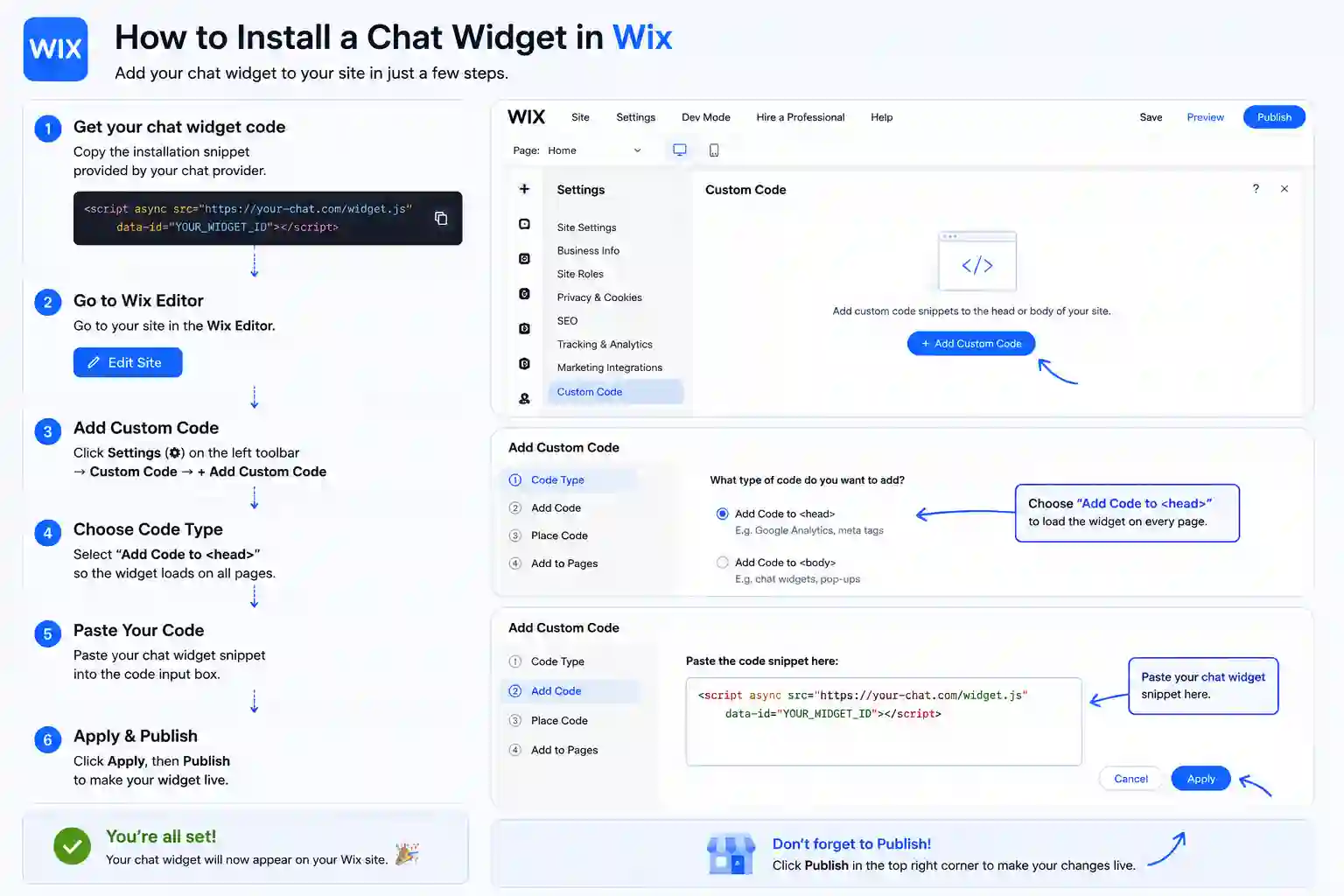
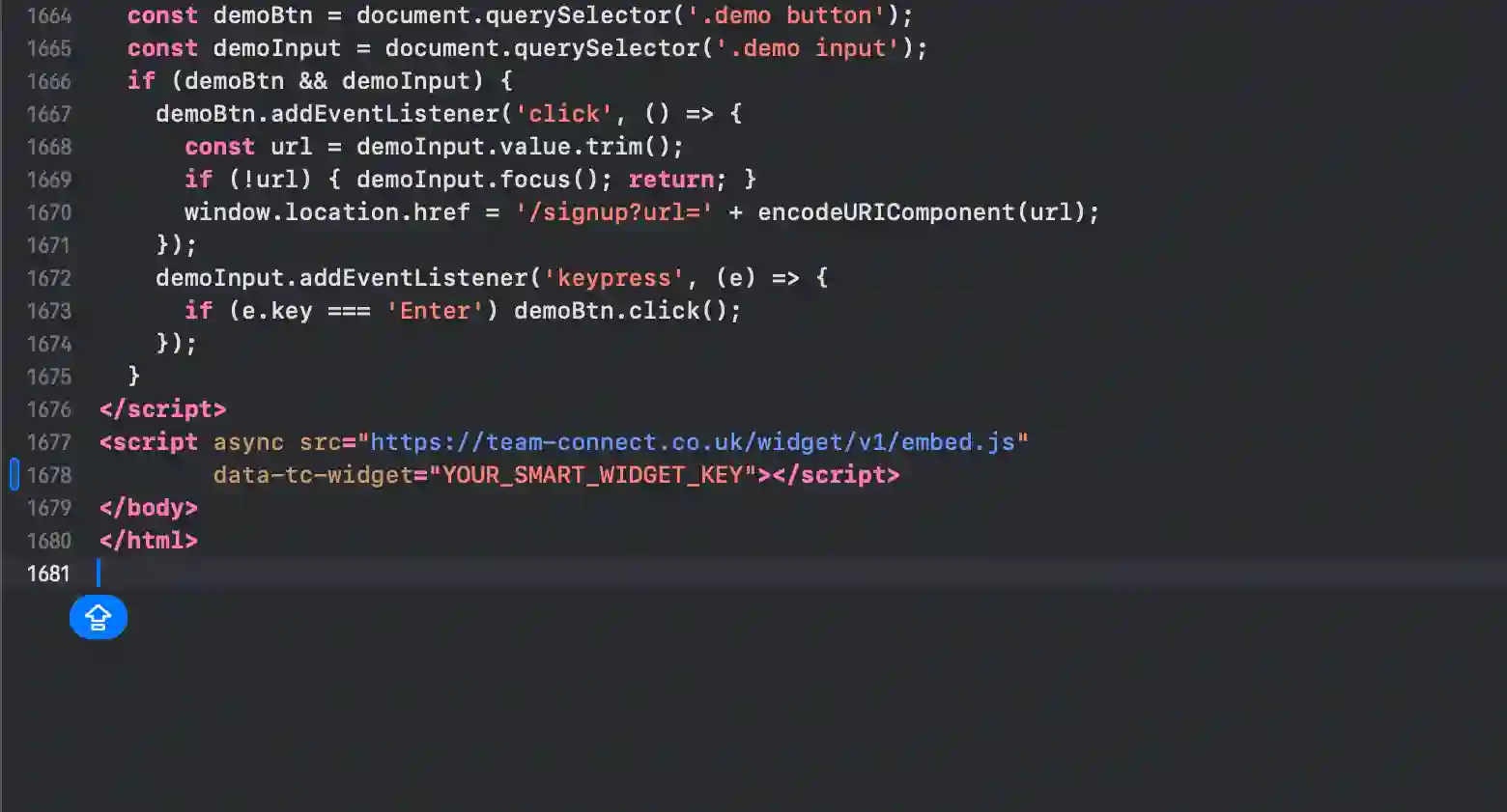
The exact panel and field to paste the snippet on every supported platform. Hostinger Website Builder is highlighted first.
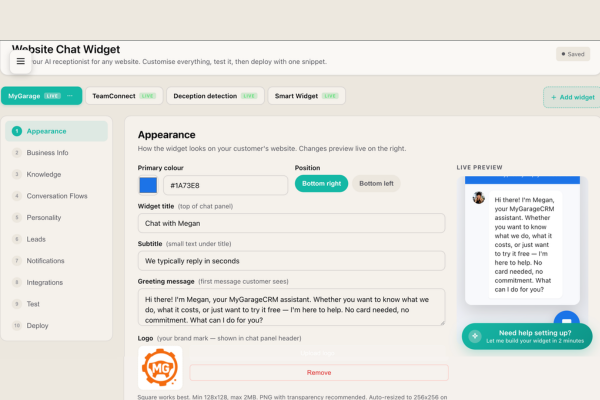
The setup dashboard runs the entire SmartWidget configuration for your Hostinger Website Builder site. The AI's understanding of your business is shown as editable Q&A pairs; the appearance is shown as a live preview; the integrations are shown as toggles; the escalation rules are shown as ordered conditions. Everything is editable in real time and every change propagates to your Hostinger Website Builder site within seconds. No engineer ever touches the setup.
The reason an AI chat widget matters so much on Hostinger Website Builder is that Hostinger Website Builder sites typically rely entirely on a contact form for visitor enquiries. Contact forms get a single-digit response rate. Visitors fill the form, never get a reply, and tab to a competitor. The widget engages every visitor at the moment of arrival — answers their question, qualifies the enquiry, captures the contact details, and alerts you on SMS. The conversion uplift on the same traffic is typically twofold.
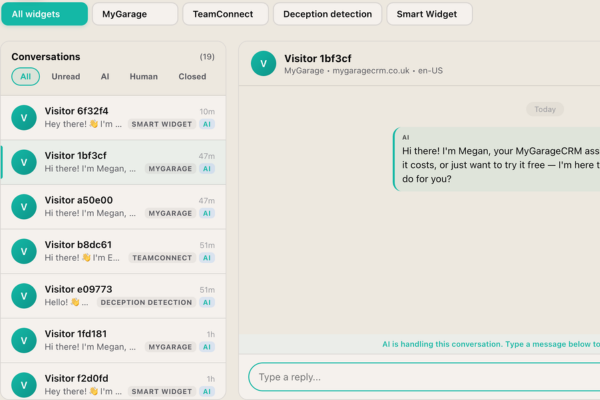
Every visitor your Hostinger Website Builder site receives has a conversation that lands in this inbox. Some are auto-handled by the AI in under eight seconds and you never need to look at them — they appear in the Completed tab. Others are escalated to you in real time, with an SMS ping to your mobile. Others again you choose to take over for relationship reasons. The inbox is the operating console for the widget on your Hostinger Website Builder site, and it scales from one site to many.
A live chat app on Hostinger Website Builder needs a human at the other end. A chatbot answers on its own. SmartWidget is a chatbot in the sense that matters — it reads your Hostinger Website Builder site during signup and answers questions about your services, pricing and availability with nobody watching the inbox — but it is not a decision-tree bot with fixed buttons. It reads the question and answers it.
Most Hostinger Website Builder owners switch because live chat software costs more per month and only works during office hours. The chatbot answers at 11pm on a Sunday and emails you the enquiries that need a person.
Live chat support inside the SmartWidget dashboard answers within minutes. The dashboard also contains a step-by-step Hostinger Website Builder-specific install guide with screenshots and the exact menu paths. If the install does not work, support will remote into a screenshare and complete it with you.
The widget includes a configurable consent notice that integrates with the major UK cookie banner solutions including OneTrust, Cookiebot, CookieYes, Iubenda, and the platform-native banners on Hostinger Website Builder where available. Consent state is respected — the widget does not initialise until consent has been granted on visitors in scope of UK GDPR.
The AI knowledge base is built from publicly accessible pages on your Hostinger Website Builder site. Content gated behind login is not included automatically. If your Hostinger Website Builder site has paid-content or member-only sections, the AI's knowledge will reflect only the public pages — which is typically what you want for visitor chat anyway.
English, French, German, Spanish, Italian, Dutch and Portuguese are supported on the Growth tier and above. The widget detects the visitor's language from their first message and replies in the same language for the rest of the conversation. Particularly valuable for Hostinger Website Builder sites serving overseas customers or operating in tourism-driven markets.
The dashboard exposes filtering rules. You can block visitors by IP range, exclude conversation triggers on specific URLs of your Hostinger Website Builder site, restrict the widget to certain pages only, and configure honeypot-style anti-spam rules. The defaults are sensible for most Hostinger Website Builder businesses; the controls are there if you need them.
Conversation transcripts and visitor contact data are retained for 30 days after cancellation, then deleted permanently. Within that 30-day window you can export the full transcript archive and the contact database as CSV from the dashboard. The widget snippet on your Hostinger Website Builder site stops loading immediately on cancellation.
No. The widget loads asynchronously after the page has rendered. The bundle is under 30KB. There is no impact on Largest Contentful Paint, Cumulative Layout Shift, or First Input Delay. Lighthouse audit before and after the install on a Hostinger Website Builder site typically shows zero score change.
Yes. The dashboard supports WhatsApp Business API integration for escalations. When the AI flags a high-intent enquiry on your Hostinger Website Builder site, it can send you a WhatsApp message with the visitor's details and the conversation context. The integration runs on top of the standard email and SMS escalation options.
The install on Hostinger Website Builder takes about five minutes end-to-end. You sign up at smartwidget.co.uk, paste your Hostinger Website Builder site URL so the AI can read it, review the auto-generated answers, copy the JavaScript snippet, paste it into Settings > Code Injection > Body, and save. The widget is live and answering visitors the moment the page saves.
No. The Hostinger Website Builder install is one line of JavaScript pasted into Settings > Code Injection > Body. If you can navigate your Hostinger Website Builder admin dashboard, you can complete the install. The walkthrough on the SmartWidget dashboard shows the exact menu path for Hostinger Website Builder with screenshots.
No. SmartWidget loads asynchronously and isolates its CSS inside a Shadow DOM, so it cannot affect your Hostinger Website Builder theme's styling, animations, or layout. It also does not block page rendering. Lighthouse and PageSpeed scores are unaffected.
Yes for any Hostinger Website Builder plan that lets you paste a script tag or custom JavaScript into Settings > Code Injection > Body. On a small number of Hostinger Website Builder entry-level tiers the custom code feature is restricted; in that case upgrading to the next plan unlocks it. Most Hostinger Website Builder Business or Pro tiers and above support SmartWidget directly.
No. There is no plugin for Hostinger Website Builder. SmartWidget installs via a single line of JavaScript pasted directly into Settings > Code Injection > Body. Avoiding the plugin route means fewer dependencies, zero conflicts with your other Hostinger Website Builder extensions, and no plugin marketplace approval process.
A single script tag with your unique widget key. Around 200 characters total. You copy it from the SmartWidget dashboard after signup, paste it into Settings > Code Injection > Body, and save. The script tag loads our widget client asynchronously when a visitor lands on your page.
4.9 out of 5 from 199 reviews. A selection of install-experience reviews from real UK businesses.
My Format portfolio is built around lots of high-resolution images and very minimal text. SmartWidget did not slow the gallery load at all — it loads async and the widget bubble only renders once images are done.
My WordPress site uses a heavily customised theme. I worried the SmartWidget snippet might conflict. The Insert Headers and Footers plugin route kept everything isolated and the theme has not been touched.
We migrated to a new accounting firm site last spring. SmartWidget was the only chat tool that installed cleanly without breaking the theme. Five minutes from signup to live.
Our firm uses a Drupal site that an agency built nine years ago. I expected the install to be painful. The agency added the script tag in eleven minutes and the widget went live the same afternoon.
Our firm runs a heavily customised Webflow site. SmartWidget installs into the End of body tag custom code field — exactly where Webflow places all scripts. Zero animation conflicts.
My Framer site is mostly animation and the widget had to coexist with three other custom code blocks. SmartWidget installed cleanly without breaking any of the existing animations or transitions.
SmartWidget installs cleanly on every major platform in this category. Explore install guides for related platforms.
Sign up, paste the snippet, save. From £19 a month, no contract.