
My Carrd single-page site had no good chat tool option until SmartWidget. The install was the body embed field in Carrd settings. Six minutes from signup to my first answered visitor enquiry on the same evening.
Single-page site live
Also searched as a Magento chat widget, chat app, live chat plugin or AI chatbot — same tool, one five-minute install.
SmartWidget is the AI chat widget UK Magento businesses ship in the morning and have live by lunch. Paste your URL, review the AI knowledge base, drop the snippet into Content > Design > Configuration > HTML Head, save. Done. From £19 a month with multi-site from the Growth tier.
For UK Magento site owners, the AI chat widget has become the standard conversion tool of 2026. The technology has finally crossed the threshold from rigid scripted chatbots to actually understanding visitor intent and answering in natural language. SmartWidget brings this to Magento via a single JavaScript snippet in Content > Design > Configuration > HTML Head. Five-minute install. From £19 a month, no contract, cancel any time.
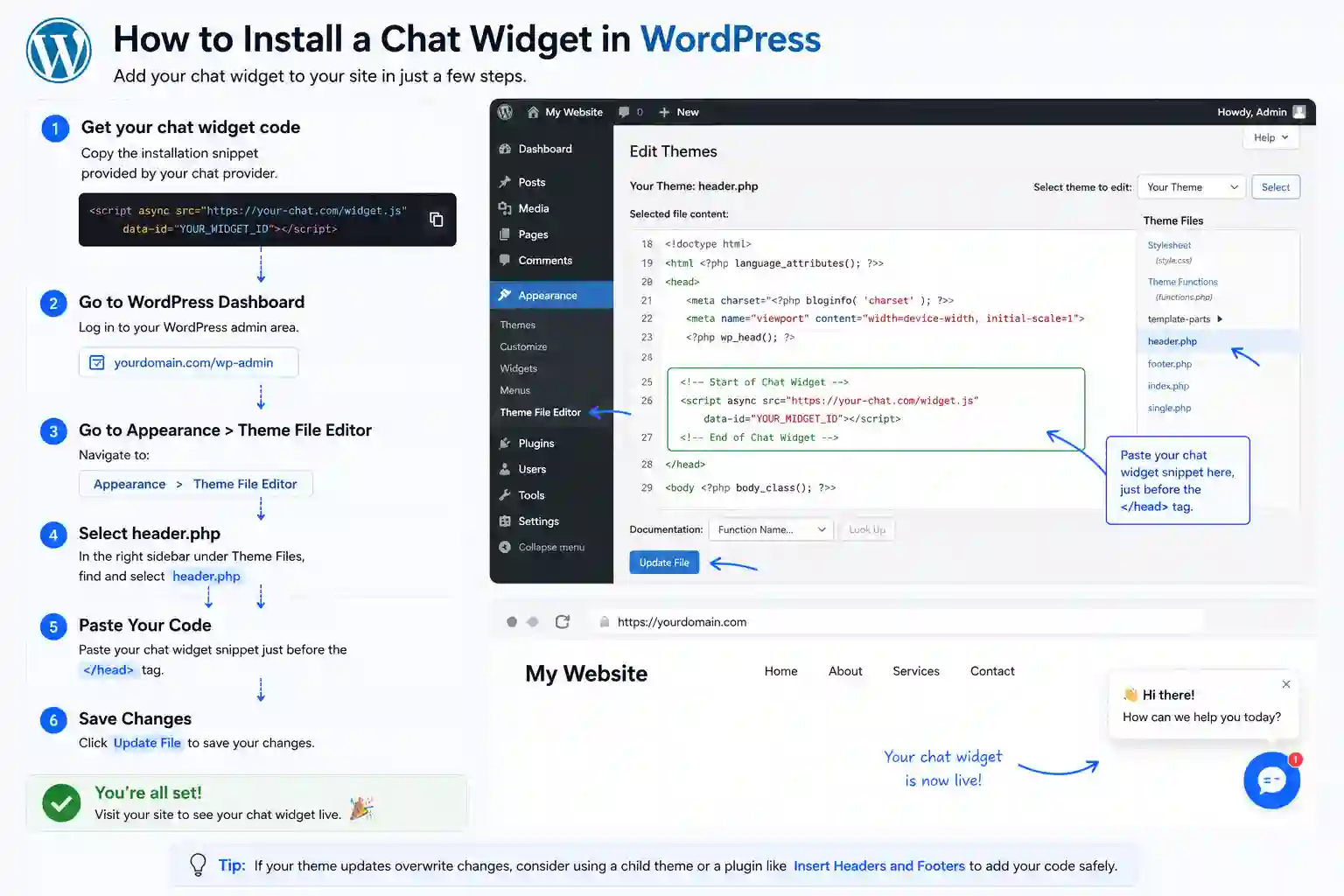
The full install end-to-end. Five steps, about five minutes from signup to the first answered visitor.
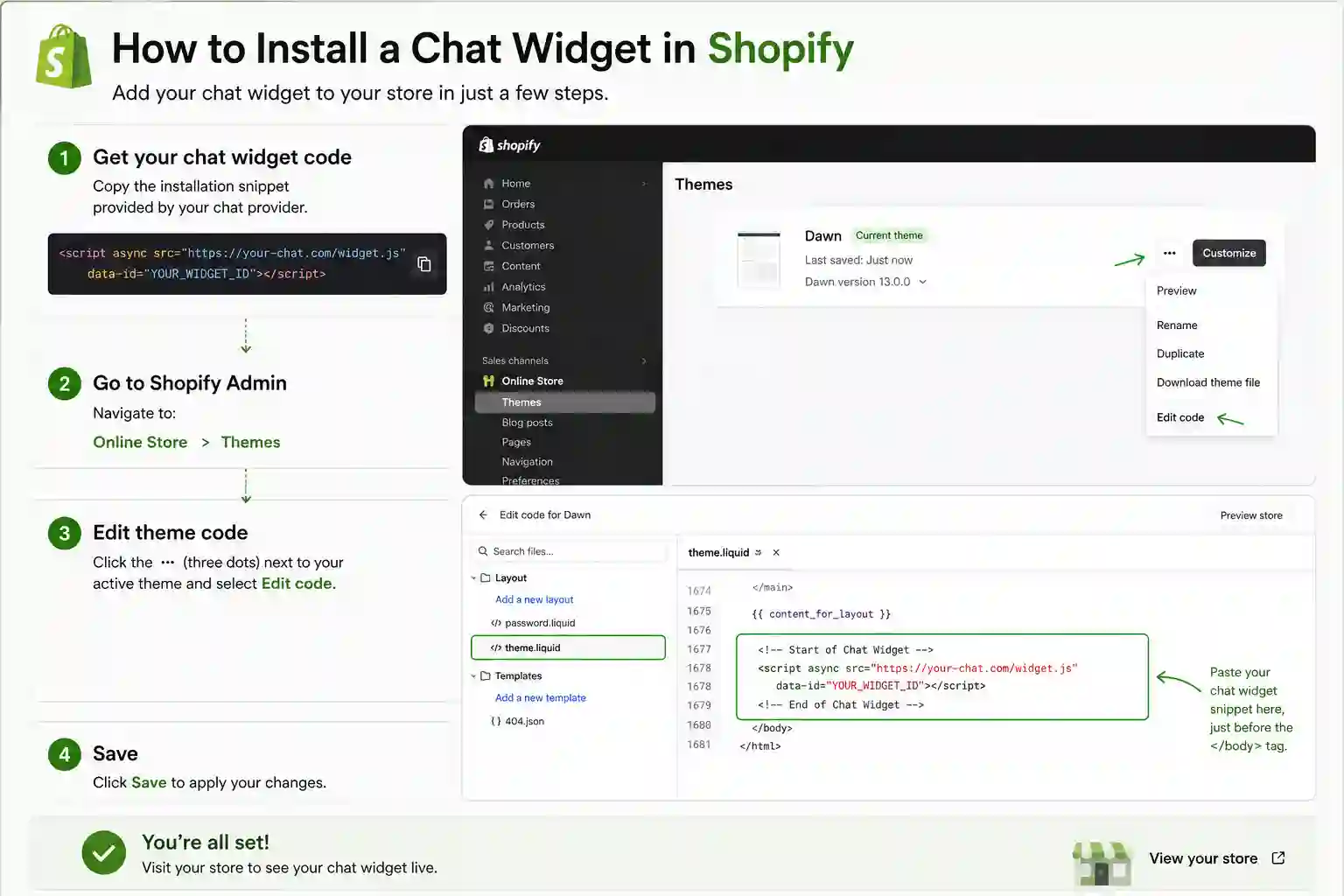
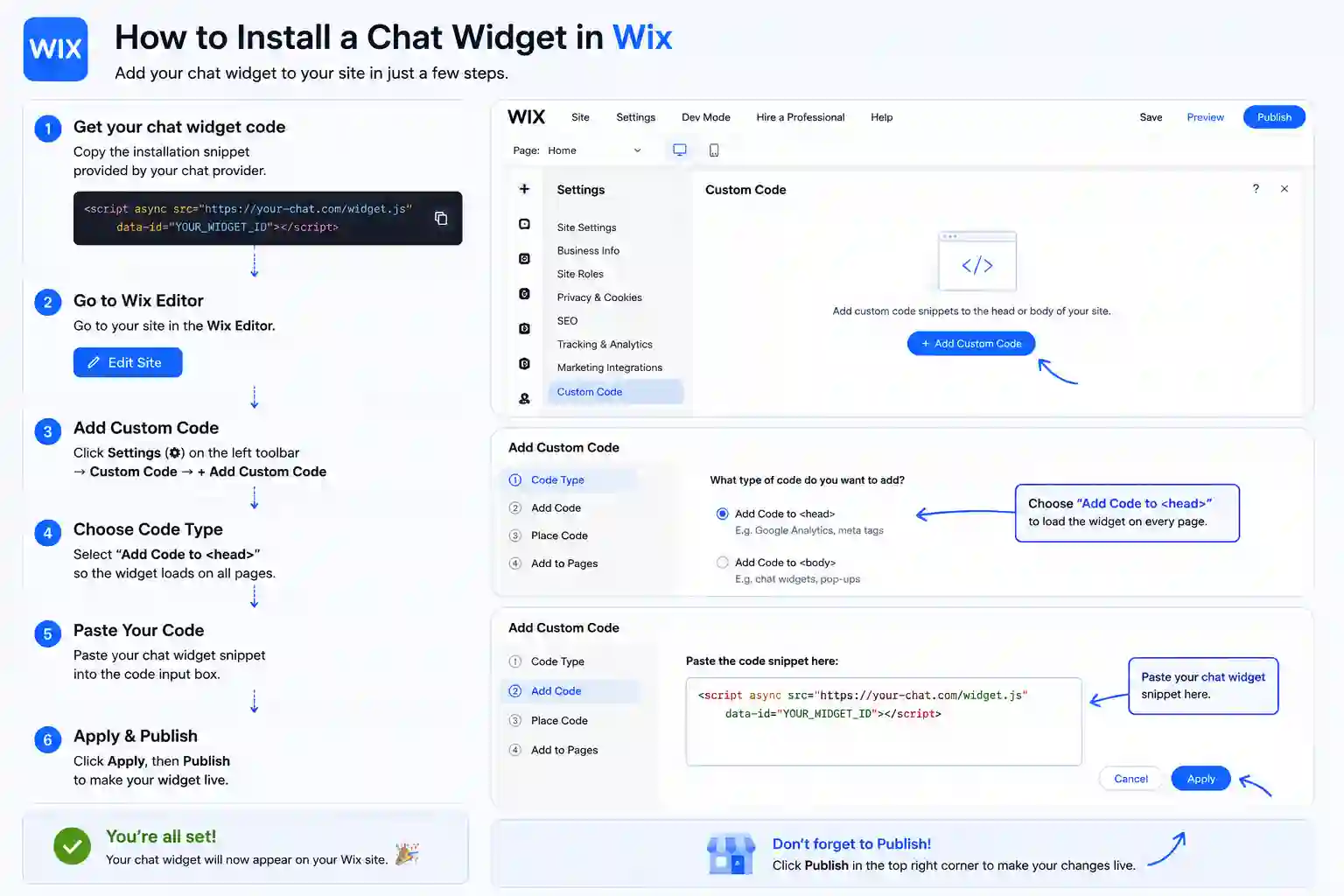
The exact panel and field to paste the snippet on every supported platform. Magento is highlighted first.
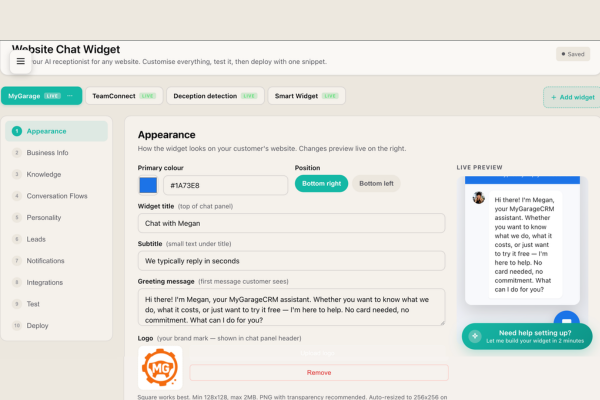
The setup dashboard is the heart of how SmartWidget configures itself for your Magento business. After the AI reads your Magento site, it presents what it has learned — draft Q&A pairs, services list, opening hours, pricing rules — in a clean editable interface. You review each section, edit anything that needs refining, override anything the AI got wrong, and save. The dashboard is also where you set the tone of voice and the rules for when the AI should escalate to a human.
Visitors to a Magento site convert better when they get an answer instantly. That's the consistent finding across every chat-widget A/B test on the market. The challenge has historically been cost — live chat needs human operators, and human operators cost £24,000 a year and only work 9 to 5. SmartWidget answers the same questions 24/7 from £19 a month. The install is one line of JavaScript pasted into Content > Design > Configuration > HTML Head.
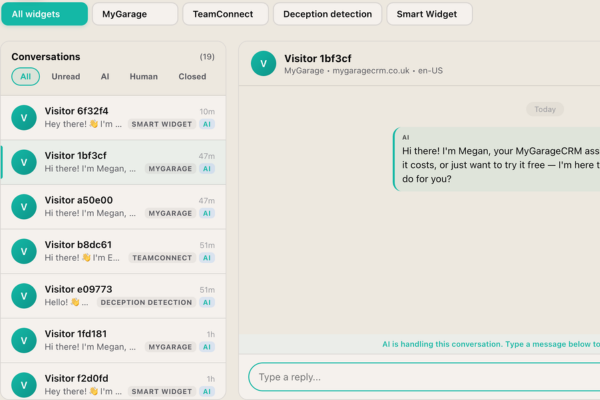
From this dashboard you can supervise every AI conversation on your Magento site, jump into any one with a single click, and intervene before the AI says something you would not. The Live tab shows in-flight conversations. The Awaiting Human tab shows escalations. The Completed tab shows the archive. The Pinned tab shows the conversations you have flagged for follow-up. The visitor sees one continuous chat thread regardless of whether AI or human is replying.
A live chat app on Magento needs a human at the other end. A chatbot answers on its own. SmartWidget is a chatbot in the sense that matters — it reads your Magento site during signup and answers questions about your services, pricing and availability with nobody watching the inbox — but it is not a decision-tree bot with fixed buttons. It reads the question and answers it.
Most Magento owners switch because live chat software costs more per month and only works during office hours. The chatbot answers at 11pm on a Sunday and emails you the enquiries that need a person.
Yes for any Magento plan that lets you paste a script tag or custom JavaScript into Content > Design > Configuration > HTML Head. On a small number of Magento entry-level tiers the custom code feature is restricted; in that case upgrading to the next plan unlocks it. Most Magento Business or Pro tiers and above support SmartWidget directly.
No. There is no plugin for Magento. SmartWidget installs via a single line of JavaScript pasted directly into Content > Design > Configuration > HTML Head. Avoiding the plugin route means fewer dependencies, zero conflicts with your other Magento extensions, and no plugin marketplace approval process.
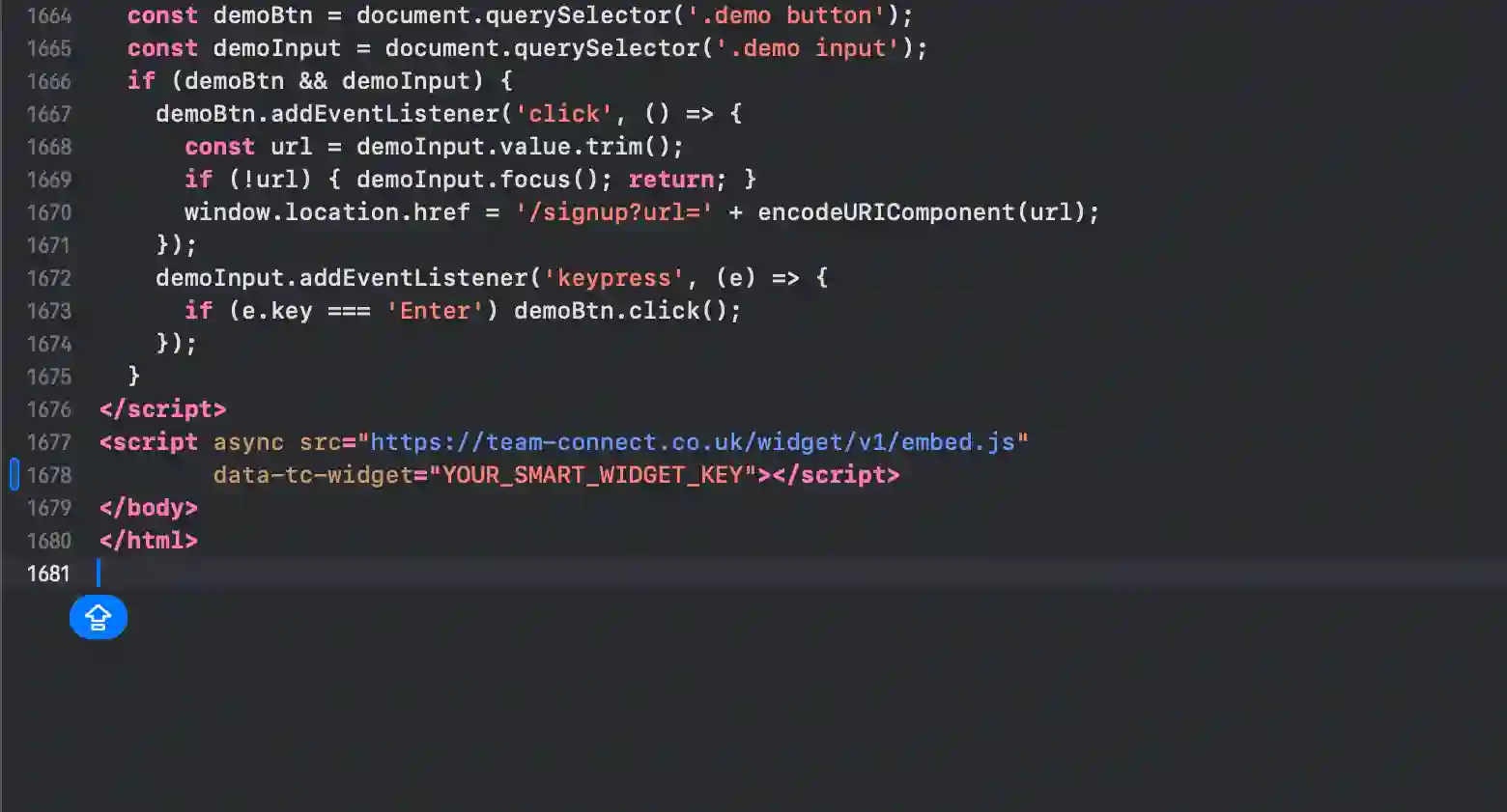
A single script tag with your unique widget key. Around 200 characters total. You copy it from the SmartWidget dashboard after signup, paste it into Content > Design > Configuration > HTML Head, and save. The script tag loads our widget client asynchronously when a visitor lands on your page.
No. The widget loads asynchronously after the page has rendered, so it does not block any of your Magento site's critical rendering path. PageSpeed and Lighthouse scores are unaffected. The widget bundle is under 30 KB and lazy-loads its UI when the visitor first interacts with the chat bubble.
SmartWidget is UK GDPR compliant by design. Conversation transcripts are encrypted at rest in UK-based data centres. The widget includes a configurable consent notice that integrates with most Magento cookie banner solutions, and the dashboard exposes the controls needed for data-subject access and deletion requests.
Yes. The widget appearance is fully customisable from the SmartWidget dashboard — primary colour, accent colour, chat bubble position (bottom-left, bottom-right), avatar, welcome message, and trigger behaviour. The customisation is centralised, so changing it once updates the widget on your Magento site immediately.
Remove the single line of JavaScript from Content > Design > Configuration > HTML Head and save. The widget disappears immediately. There is nothing else to uninstall from Magento — no database tables, no orphaned files, no leftover configuration.
Yes. Multi-site is built in from the Growth tier. One SmartWidget subscription can run widgets across multiple Magento sites, each with its own AI personality, knowledge base and unified inbox. Particularly useful for agencies running client Magento sites or operators with multiple brand sites.
Yes. The widget is responsive by default and works on every Magento mobile breakpoint. The chat bubble sits in the bottom corner on every screen size and the chat interface adapts to mobile-optimised layout when a visitor opens it on a phone.
Yes. The widget integrates with Google Calendar, Outlook (Microsoft Graph), and the built-in SmartWidget scheduler. Visitors browsing your Magento site can be offered specific appointment slots and book directly inside the chat. The event writes back to your calendar with the conversation transcript attached.
A small number of Magento entry-level tiers restrict custom code. In that case, upgrading to a tier that allows custom JavaScript is the only path. If Magento does not allow custom code on any tier, SmartWidget cannot be installed — but this is rare. Almost every modern Magento Business or Pro plan supports it.
No. SmartWidget operates on monthly billing with no contract and no minimum commitment. Cancel any time directly from the dashboard with no notice period and no exit fee. The lowest tier is £19 per month, billed monthly, so the maximum risk on the decision is a single month's spend.
Live chat support inside the SmartWidget dashboard answers within minutes. The dashboard also contains a step-by-step Magento-specific install guide with screenshots and the exact menu paths. If the install does not work, support will remote into a screenshare and complete it with you.
The widget includes a configurable consent notice that integrates with the major UK cookie banner solutions including OneTrust, Cookiebot, CookieYes, Iubenda, and the platform-native banners on Magento where available. Consent state is respected — the widget does not initialise until consent has been granted on visitors in scope of UK GDPR.
4.9 out of 5 from 199 reviews. A selection of install-experience reviews from real UK businesses.
My Carrd single-page site had no good chat tool option until SmartWidget. The install was the body embed field in Carrd settings. Six minutes from signup to my first answered visitor enquiry on the same evening.
Across roughly forty client sites the install is exactly the same — paste one line, configure tone, hand back to the client. The agency dashboard handles all forty from one inbox. Two clicks per onboard.
We run a WooCommerce store with twelve plugins already. I worried about JavaScript conflicts. The install was a single line in the footer and there have been zero conflicts in eight weeks live.
We host our own static site built with Eleventy and deploy via Netlify. SmartWidget is a single script tag in the base layout. Build pipeline rebuilt automatically. Live in nine minutes total.
The compliance review took longer than the install. Our IT director approved the JavaScript snippet in ten minutes and confirmed it loads async with no client data exposure. Install itself was four minutes.
My Weebly site is the cheapest plan that still allows custom code. SmartWidget installed via the SEO footer code field in five minutes. Now capturing weekend enquiries that used to go to voicemail.
SmartWidget installs cleanly on every major platform in this category. Explore install guides for related platforms.
Sign up, paste the snippet, save. From £19 a month, no contract.